TestFlight is where most iOS teams end up for beta testing: no device UDIDs to collect, testers install from an app they already know, and the same build can go on to the App Store. It also has hard limits and a review step that catch teams out, usually on a Friday afternoon. These are the numbers that matter, from Apple's App Store Connect documentation as it reads on 25 October 2026, what each one means for a release team, and which parts are worth automating.
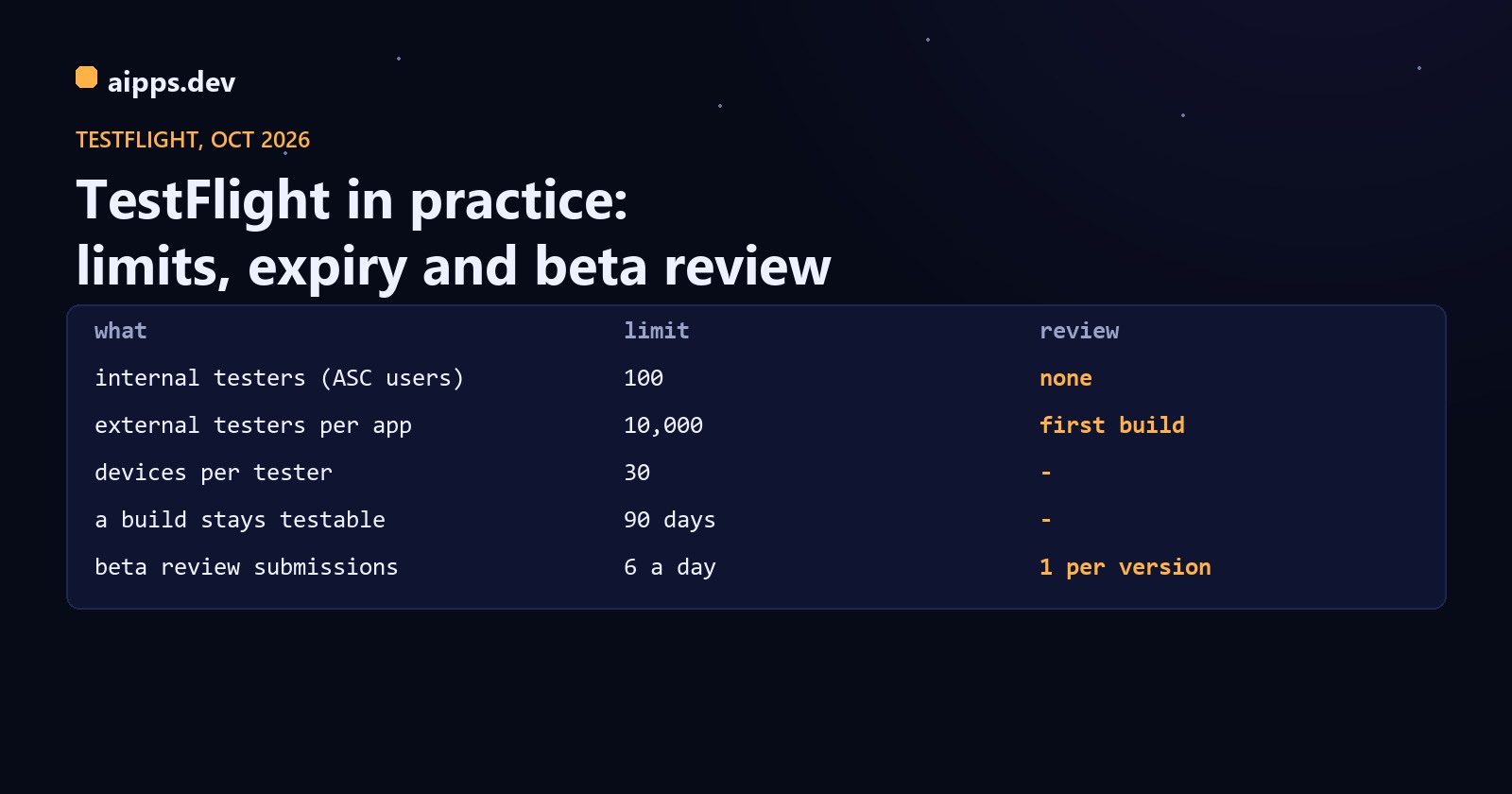
The limits in one table
Two of these drive most of the planning: internal testing is limited to 100 people who must be members of your App Store Connect team, and everyone else is an external tester whose first build of each version waits for Beta App Review.
Internal testers: 100 seats, no review
An internal tester is an App Store Connect user with access to the app and one of five roles: Account Holder, Admin, App Manager, Developer or Marketing. You can have up to 100 of them, each on up to 30 devices. Builds reach them as soon as processing finishes, with no review. Apple doesn't give a processing time; it only says that a build still in Processing after 24 hours may have a problem. Codemagic's support notes put the usual wait at 5 to 30 minutes, with first uploads of a new app slower.
Two settings decide whether internal testers get builds without anyone clicking. On each internal group, tick Enable automatic distribution, and new builds are added as they finish processing. The exception is Xcode Cloud: Apple's help page says builds created by Xcode Cloud must always be added to groups by hand. Builds marked TestFlight Internal Only (an export option in Xcode and Xcode Cloud) can never be given to external groups, which is a useful guard for builds with a debug menu.
The catch with internal seats is that they are team seats. A tester who only needs to try the app now has a user in your App Store Connect team with, at the least, the Marketing role, which can see app metadata and more. For a client, a contractor or a friendly customer, an external group is usually the better fit even with the review.
External testers: 10,000, behind Beta App Review
External testers need only the TestFlight app and an invitation: an email, or a public link. Up to 10,000 per app. Before you can make an external group you need at least one internal group, and before the first build reaches external testers it goes to Beta App Review. Apple's wording is that the first build you submit requires a full review, but later builds for the same version might not. In practice:
So a hotfix build of a version already in testing usually goes out quickly, and a version bump costs you a review. Teams that bump the marketing version on every merge pay that review every time; keeping the version fixed through a beta cycle and raising only the build number avoids it.
How long beta review takes
Apple publishes no figure for TestFlight. Its general App Review statement is that it reviews at least 50% of submissions in under 24 hours and 90% in under 48 hours. The only measured numbers we found are from Runway's tracker (runway.team/appreviewtimes), which averages its own customers' submissions over two weeks: on its page updated 22 October 2026, waiting for beta review averaged 14 h 47 min and the review itself 1 h 15 min. Worked through for a build uploaded at 10:00 on a Thursday:
Averages hide a long tail: Apple's own 90% line is 48 hours, and developer forum threads in 2026 describe builds waiting several days. If a demo or a beta deadline depends on external testers, submit the first build of the version at least two working days ahead. The submission limits are strict too: one build of each version in review at a time, and six submissions per app in 24 hours. A rejected build can't be fixed in place; upload a new build number.
What the review needs from you
Beta App Review reads the Test Information page: a beta app description, a feedback email, contact details and, if the app has a login, a demo account that works. Missing sign-in details are a common reason for a rejected beta. The What to Test text is set per build and is what testers see in the TestFlight app.
The public link
A public link lets anyone with the URL join an external group, up to the group's cap. Since TestFlight 3.6 (October 2024) you can filter who may join by device type and OS version, for example iPhone only on iOS 17 or newer, and you can set a cap anywhere from 1 to 10,000. Testers who join by link appear in App Store Connect as anonymous, without a name or email, so you can't follow up with one person; the API does give link usage metrics (GET /v1/betaGroups/{id}/metrics/publicLinkUsages). Disable the link when the group is full or the test ends; you can turn it back on later.
The 90-day expiry
Every build can be tested for 90 days from upload. After that its status becomes Expired and testers can no longer use it. That applies to internal testers too. Apple makes one exception: if you don't expire a build and it goes live on the App Store, testers can keep using it. For a team that ships to testers weekly this never bites; for a team whose last beta was three months ago, it shows up as testers reporting that the app suddenly won't open. Worked dates and two habits that help:
Missing Compliance, the status that holds a build
A build that shows Missing Compliance is waiting for export compliance answers, and until someone answers, testers don't get it. You answer for every upload unless the answer is in the app: set ITSAppUsesNonExemptEncryption in Info.plist. NO covers apps that use no encryption or only exempt encryption, such as HTTPS through the system APIs; if you use non-exempt encryption, set YES and add the ITSEncryptionExportComplianceCode Apple gives you.
This one key removes a manual step from every upload, and it is the first thing to fix if TestFlight distribution is meant to run on its own.
Automating the rest
Everything above has an API. With an App Store Connect API key (Apple's preferred auth for CI, with no two-factor prompts) a pipeline can upload, wait for processing, set What to Test, add the build to groups and submit it for beta review. In fastlane that is one action:
Without fastlane, the same steps are App Store Connect API calls: list the app's builds until processingState is VALID, set What to Test through betaBuildLocalizations, POST to /v1/betaGroups/{id}/relationships/builds, then POST /v1/betaAppReviewSubmissions for external groups. Polling is cheap against the limit: one status check every 30 seconds is 120 requests an hour, against the 3,500 an hour in Apple's example header. Since October 2025 App Store Connect can also send webhooks for build upload and beta build status changes, which replaces polling. Two permission notes: the Developer role can upload but can't change testers or build information, which needs App Manager or Admin; and fastlane's skip_waiting_for_build_processing can't be combined with distribute_external, because a build has to finish processing before it can be submitted.
When TestFlight is the wrong tool
TestFlight wants an App Store build, an upload and, for external testers, a review. For a developer checking a fix on their own phone, or a tester who needs today's branch in the next five minutes, an ad hoc build installed from a link is faster: no processing and no review, but only on iPhones whose UDID is in the profile, up to 100 a year. Our comparison, ad hoc vs TestFlight vs Play internal testing, puts the channels side by side with Android's tracks.
aipps.dev builds your iOS app on our own Mac mini. Ad hoc builds get a QR install page for the testers who can't wait for TestFlight.
Make an install linkRelated: installing an ad hoc build from a QR code, and the 2026 and 2027 store deadlines for the Xcode version App Store Connect accepts.
Sources, read 25 October 2026: Apple App Store Connect Help (TestFlight overview, Add internal testers, Invite external testers, App build statuses, View builds and metadata, Provide export compliance information for beta builds, View tester feedback); developer.apple.com/testflight and the TestFlight release notes; Apple, ITSAppUsesNonExemptEncryption reference; App Store Connect API (Identifying rate limits, Beta Groups, Beta App Review Submissions); developer.apple.com/distribute/app-review (50% in 24 hours, 90% in 48); TestFlight on the App Store (version 4.4.1 and its requirements); fastlane upload_to_testflight docs; Runway, runway.team/appreviewtimes (updated 22 October 2026); Codemagic help, How long does publishing to TestFlight take.