A React Native app has no push system of its own. An iPhone gets its notifications from Apple's APNs and an Android phone from Google's FCM, and your server has to authenticate to both. The short answer on credentials: use a .p8 key for APNs, because Apple's certificates last a year and cover one app each, and a service account for FCM HTTP v1, because the old server key endpoint is gone.
This guide compares the two APNs methods with Apple's current limits, including the environment-specific keys that catch people out, gives the FCM legacy shutdown dates as they moved, and shows which token each sending route needs from React Native. On 2 November 2026 we also called the live APNs and FCM endpoints to record what they answer. Those results are below, with the scripts we ran.
.p8 key vs certificate
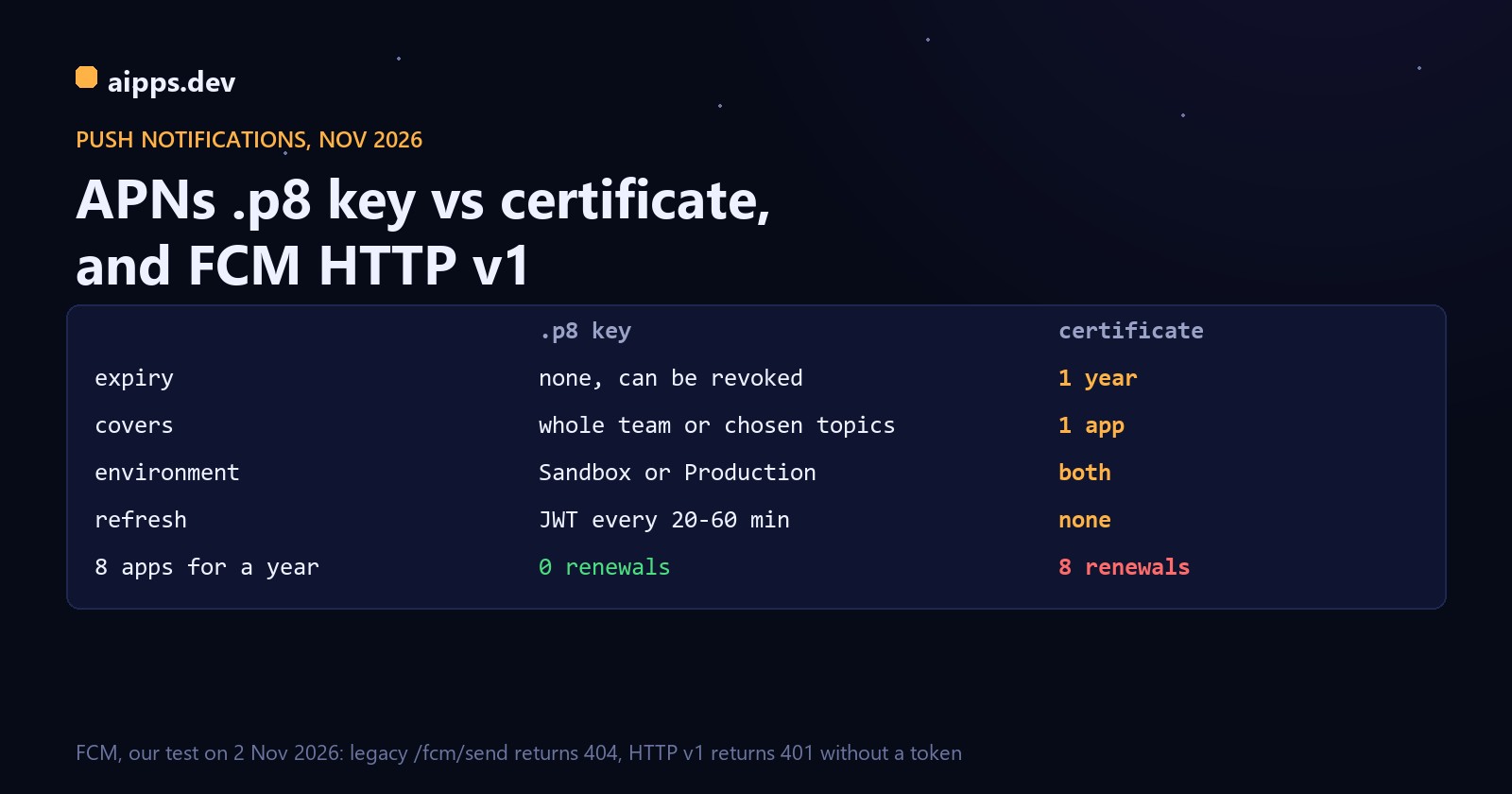
Here is what that means for a team with 8 apps over a year. Certificates mean 8 renewals, one every 46 days on average if they were created at different times (365 / 8), and each one that slips stops that app's notifications. A team-scoped key means 0 renewals and one secret to protect. Your server does make a new JWT instead: at one every 50 minutes that is about 29 a day, all automated.
The key's real cost is a little size on the wire. Our test JWT with a 10-character Key ID and Team ID came to 200 characters, so about 207 bytes with the "bearer " prefix, on every request. Apple asks you to send that header without HPACK indexing, so the header table won't shrink it. For 100,000 notifications that is roughly 21 MB of extra upload, which is small next to a missed renewal.
"One .p8 for all apps" now has an asterisk
Most guides still say one .p8 covers everything. It can cover every app, but Apple's documentation now describes team-scoped keys that are restricted to either Sandbox or Production. Older keys that work in both environments stay supported, though Apple recommends separate keys per environment. Apple's account help is less current here: one page still says the signing key "works for both the development and production environments", while the create-a-key page asks you to choose an environment configuration and a key type.
We hit this ourselves. In October 2026 a key of ours created as Sandbox-only passed a sandbox check, and then production APNs refused it with BadEnvironmentKeyInToken. Apple's error table spells that code BadEnvironmentKeyIdInToken, so if your alerting matches on the string, match both. Check the environment on the key's details page before you debug anything else.
Which build talks to which host is the other half of it. Builds run from Xcode use the sandbox, api.sandbox.push.apple.com. TestFlight, ad hoc and App Store builds use production, api.push.apple.com. A device token from one environment sent to the other host comes back as BadDeviceToken, and Apple's description of that error tells you to check "that the token matches the environment".
Three connection rules matter once you send for several apps or teams. APNs ties a connection to one team and its bundle IDs at the first push, so use a separate connection pool per developer account. After you add a new bundle ID to a team, open new connections, or pushes to it will fail on the old ones. And don't mix keys on one connection: after a first push with a team-scoped key, a topic-specific key or a key from the other environment gets an error.
Use topic-specific keys when you want to limit the damage from a leak, such as a contractor's server that should only reach one app. Otherwise, one team-scoped key per environment is the simplest setup that follows Apple's advice.
Making the APNs token
The JWT has four values: alg (always ES256), kid (the Key ID), iss (the Team ID) and iat (seconds since the epoch). Apple's window is narrow on both sides: refresh no more than once every 20 minutes and no less than once every 60. Too old returns ExpiredProviderToken (403), and too frequent returns TooManyProviderTokenUpdates (429). A new token for every request is the classic way to hit the second one, so make one, cache it and replace it at around 50 minutes.
We ran this request shape against both hosts on ports 443 and 2197, using a key we generated ourselves, which Apple has never seen. All four host and port pairs gave identical answers:
The last line is worth knowing. A stale token signed with an unknown key says Invalid, not Expired, so with an unrecognised key you won't see ExpiredProviderToken at all. If you see InvalidProviderToken, check the key, Key ID and Team ID first, not the clock.
If you prefer curl, check that your build has HTTP/2 first with curl -V | grep HTTP2, because APNs needs it. The curl 8.1.2 we had on Windows, a Schannel build without HTTP/2, failed with "Received HTTP/0.9 when not allowed", which looks nothing like a missing feature.
Certificates you still have: find the expiry
If you run certificates today, check the dates before planning anything. This reads the end date from an exported .p12, and we tested it with OpenSSL 1.1.1 on a throwaway certificate:
Moving to a key is low risk, because the two can run side by side. Create the key, send a share of traffic with it, and retire the certificate when it expires. Device tokens identify the device and app, not how your server signs in, so they stay as they are.
FCM legacy: the dates, as they moved
Plenty of pages quote one shutdown date with confidence, but the date moved and sources still disagree:
Firebase's migration guide is no longer at its old address: docs/cloud-messaging/migrate-v1 returned 404 when we read it on 2 November 2026, so the 22 July date above comes from a search index copy of that page and Airship's release note. The practical point doesn't depend on which July date is right, because the endpoint is gone:
The 404 is a plain HTML page and it came back with or without a key, so an old sender sees no FCM error code at all. If a code path parses the response as JSON, it may log a parse error instead of a push failure, so search your logs for that as well as for failed sends.
FCM HTTP v1: what changes
The access token replaces the permanent server key. It comes from a service account JSON with the scope https://www.googleapis.com/auth/firebase.messaging and it expires, so cache it until shortly before the expires_in Google returns (3,600 seconds when requested for an hour):
We ran the token script against Google with a service account we made up, and it failed the way it should: invalid_grant, "Invalid grant: account not found". That error means Google doesn't know the account, so look for a deleted account or the wrong JSON file. If the account exists but can't send, give it the Firebase Cloud Messaging API Admin role.
Two more dated changes are coming, and both are easy to miss. Firebase is moving from registration tokens to Firebase Installation IDs: its send docs now describe the message's token field as deprecated and recommend a fid field once clients are registered that way, though both are fully supported during the migration and the docs give no end date. And the InstanceId server APIs and device groups are deprecated and will be decommissioned on 29 September 2027, with new users able to start on them only before 1 January 2027. Don't build anything new on device groups.
Limits to plan around
Which token does React Native need?
This is where most React Native push bugs start: the token your JavaScript gets must match the route your server sends through.
With @react-native-firebase/messaging, getToken() returns an FCM token on both platforms, and that token only works through FCM. A direct APNs route needs getAPNSToken() on iOS. If you send through FCM to iOS without a working APNs key in Firebase, expect THIRD_PARTY_AUTH_ERROR (401), which Firebase describes as "APNs certificate or web push auth key was invalid or missing". The key goes in the Firebase console under Settings, General, Cloud Messaging.
With Expo, getExpoPushTokenAsync() gives a token for Expo's service only, and getDevicePushTokenAsync() gives the native APNs or FCM token for any other route. Two Expo traps: remote notifications aren't available in Expo Go on Android from SDK 53, so you need a development build, and on Android 13 and later the permission prompt won't appear until a notification channel exists, so call setNotificationChannelAsync before asking for a token.
Setup, start to finish
1. Apple key. In your developer account (Account Holder or Admin role), go to Certificates, Identifiers & Profiles, then Keys, then +. Tick Apple Push Notifications service, click Configure, and choose the environment and key type. Download the .p8, because you can only do it once. Note the 10-character Key ID and your Team ID.
2. App ID. Turn on Push Notifications for the identifier. In the app, add the Push Notifications capability, plus Background Modes, Remote notifications if you send silent pushes.
3. Firebase. Add a project and an Android app with your package name. Download google-services.json for the app; Expo says this file holds public identifiers and can be committed. Then go to Project settings, Service accounts, Generate new private key. That JSON is a real secret, so keep it out of git.
4. Server. Store the .p8 and the service account JSON in your secret store, one set per environment. Cache the APNs JWT for about 50 minutes and the FCM token until shortly before it expires.
5. Build and test on a real phone. Debug builds go to the sandbox host and TestFlight or ad hoc builds to production, so test both before release. Install a test build from a QR code is the quick way to get an ad hoc build onto a phone. If the entitlement or provisioning profile is the problem, our guide to code signing for React Native teams explains what signs what.
6. Clean up tokens. Delete a token when APNs says Unregistered (410) or FCM says UNREGISTERED (404). Firebase says that record "will never again be valid". Be careful with FCM's INVALID_ARGUMENT (400): it can mean a bad payload, not a bad token, so don't delete tokens on it until you've ruled out the payload.
What each error means
Don't want to run two push clients and two token caches? Upload your .p8 key and Firebase service account to aipps.dev and send to iPhones and Android phones with one HTTPS call. Each result comes back with Apple's or Google's own reason code, and aipps.dev stores no device tokens or message text. aipps.dev keeps one APNs key per app, so upload a key that covers the environment you send to: Sandbox & Production if you have one, or Production for TestFlight and store builds.
Read the push docsSources, read 2 November 2026: Apple, Establishing a token-based connection to APNs (team-scoped and topic-specific keys, limits, refresh window, connection mapping), Establishing a certificate-based connection to APNs (one app per certificate, valid for a year), Sending notification requests to APNs (hosts, port 2197, headers, 4 KB and 5 KB, 30-day storage) and Handling notification responses from APNs (error table, 15-minute retry); Apple Developer account help, Create a private key and Communicate with APNs using authentication tokens. Firebase, Send messages with the v1 API, Admin SDK send docs (FIDs, 500 per multicast), Throttling and quotas, Best practices for registration management (1 month, 270 days), Message lifespan, ErrorCode reference, Troubleshooting (29 September 2027, 1 January 2027). Expo, FCM credentials, Notifications SDK reference, Push notifications FAQ (600 a second), blog posts of 11 March and 19 June 2024. Airship release note (22 July 2024). Firebase's own migration page was no longer online; its dates come from a search index copy, and the 20 June 2023 deprecation also from a copy quoted in go-fcm issue 38. Our checks on 2 November 2026 ran from a Windows machine: APNs with Python httpx over HTTP/2 and a self-generated P-256 key, FCM with curl, and google-auth with a made-up service account. No real device tokens or live keys were used in those checks, so they don't cover delivery after authentication. The BadEnvironmentKeyInToken result is from our own key, October 2026.