A link to your site should open your app when the app is installed and fall back to the web page when it isn't. iOS calls this universal links, Android calls it App Links, and both work the same way at heart: you put a JSON file on your web server that names your app, the app names your domain, and a verifier owned by Apple or Google checks that the two agree. When the check fails nothing warns you. The link just opens the browser.
This guide covers both files, the exact hosting rules, how each OS fetches and caches them, the commands that tell you whether verification passed, and the failures we see most. To see how the rules behave in practice, on 30 October 2026 we fetched the files of 28 well-known app domains (Airbnb, Amazon, Flipkart, GitHub, LinkedIn, Spotify, Swiggy and others) three ways: straight from each site, from Apple's associated-domains CDN, and through Google's Digital Asset Links API, which is what Android's verifier relies on. Our script and raw results are summarised below.
The two files side by side
Two differences matter more than the rest. Apple identifies your app by team and bundle ID, so the same file works for every build your team signs. Google identifies it by the signing certificate's fingerprint, so a debug build, an upload-key build and the Play-signed build are three different identities unless the file lists all of them. And iPhones never read your server directly: since iOS 14 they ask Apple's CDN, so what matters is what the CDN managed to fetch, not what your browser shows.
apple-app-site-association: a file that verifies
Each host needs its own file: example.com and www.example.com are two domains to Apple, and each must serve the file itself. Here is one for a shop app that sends product and order pages to the app but keeps account pages on the web:
How the components are read: iOS walks the list top to bottom and stops at the first match, so put exclusions before the broad rules they carve out. In a pattern, * matches any run of characters (including none), ? matches exactly one, and ?* means at least one. The "?" key matches query items by name, so ?code=?????? only matches six-character codes, and "#" matches the fragment. Matching is case-sensitive unless you set caseSensitive: false, globally in defaults as here or per component. A URL that matches no component opens in Safari.
Of the 28 domains we fetched, 15 use components, 12 still use the older paths array (Uber, Slack, Spotify, Flipkart, Zomato among them) and one, Pinterest, serves a signed PKCS#7 file. Medium even uses the iOS 9 layout where details is an object keyed by app ID. The CDN served every one of them, so old formats still load, but the paths format has no query or fragment matching; write components for anything new.
Size
Apple has limited the file to 128 KB uncompressed since iOS 9.3.1 in 2016, after oversized files caused apps to hang (Apple's App Search revision history, April 2016). The largest file in our sample was LinkedIn's at 95,995 bytes; Amazon's was 77,833 and the smallest, Myntra's, 277. If yours is growing past 50 KB, it is usually listing paths one by one: use wildcards, or substitutionVariables to name a list once and reuse it.
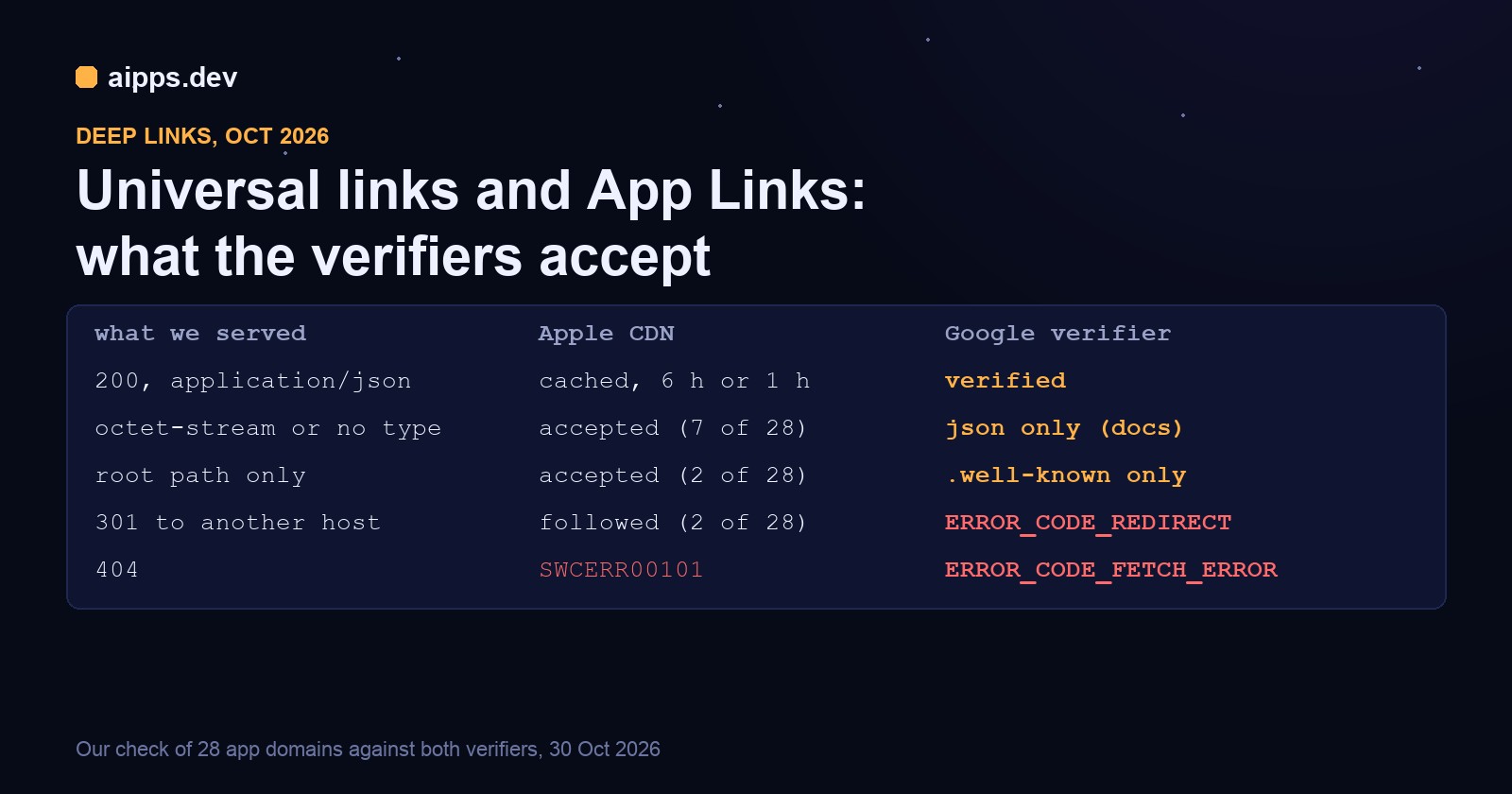
What Apple's CDN actually accepts: our check of 28 domains
Apple's CDN has a public endpoint, https://app-site-association.cdn-apple.com/a/v1/<host>, and it returns the copy devices get, with headers that say where it came from. All 28 domains had a copy there. What the sites themselves served was messier:
Four things follow from this, and they are worth knowing before you spend an afternoon on content-type headers:
1. Content type is not what breaks iOS. Seven of the 28 serve the file as application/octet-stream (Amazon, Notion, Flipkart, Figma, and GitHub and Duolingo at the root path) or with no Content-Type header at all (Zomato), and the CDN served all of them, relabelled as application/json. Serve application/json anyway, because Android's verifier requires it for assetlinks.json and it costs nothing.
2. The root path still works. GitHub and Duolingo return 404 at /.well-known/apple-app-site-association and 200 at /apple-app-site-association, and the CDN's Apple-From header shows it took the root copy. New files belong in /.well-known/, but an old root-only file is not your bug.
3. Apple's CDN followed a redirect to another host. spotify.com answers with a 301 to www.spotify.com, and www.paytm.com with a 301 to paytm.com. In both cases the CDN served the file and its Apple-From header lists both URLs. Apple's documentation still says "with no redirects", so don't build on this: it is undocumented, and Google's verifier does the opposite (next section).
4. Testing from your own laptop can mislead you both ways. Pinterest answered our client with a 403 and TikTok didn't answer at all, yet the CDN had both files. Bot rules and firewalls treat Apple's fetcher differently from curl, so check the CDN copy, not only your own request.
The CDN response headers tell you what happened. A good copy carries Apple-From and Apple-Origin-Format; a failed one carries Apple-Failure-Reason:
The CDN's own Cache-Control was max-age=21600 (6 hours, or what was left of it at that edge) for 21 of the 28 domains and 3,600 (1 hour) for the other 7, and 3,600 for a failed fetch. Apple's documentation says the CDN requests your file within 24 hours and that devices check for updates about once a week after the app is installed. In practice: a fixed file reaches new installs within a day, and existing installs within about a week.
assetlinks.json: a file that verifies
The file is an array, one statement per app. sha256_cert_fingerprints takes several values, and that is where most Android failures come from. If you use Play App Signing, Google re-signs your app with its own key, so the fingerprint from keytool on your upload keystore does not match what users install. The right value, and a ready-made assetlinks snippet, are in Play Console under Release > Setup > App signing. List the app signing key, and also the upload key if you hand out upload-key builds to testers (for example through an install link or QR code).
The fingerprint counts in our sample show how common this is: Uber lists 42, Amazon 33, Slack 24 across its 6 statements, and Notion exactly 1. Big apps keep one fingerprint per key that ever signed a build people still have.
Unlike iOS, Android does not take the URL patterns from the file. They live in the app's intent filter, and verification only says yes or no per host. From Android 15 (with Google services) you can add dynamic rules to the file: a relation_extensions block with dynamic_app_link_components, using the same /, ?, # and exclude keys as Apple's components. Devices fetch it periodically and merge it with the manifest, but the rules can only narrow what the manifest allows, never widen it, and Android 14 and lower ignore them. So declare broad hosts in the manifest and refine paths in the file if most of your users are on 15+.
Redirects: where Google is strict
Google's verifier refuses any redirect on the file, and its API tells you so in plain words. www.paytm.com, which the Apple CDN happily followed above, is the only domain in our 28 that Google failed:
Its assetlinks.json redirects to paytm.com, so an app that lists www.paytm.com in its intent filter cannot verify that host. The other 27 returned statements, including medium.com, whose server sent our client a 403 but answered Google's fetcher. Errors are cached for 10 minutes (maxAge 600 s), so after a fix you can retest almost at once.
What happens when verification fails changed with Android 12. Since then an https link to a host that is not verified for any app opens in the default browser; before, users got a chooser. And on Android 11 and lower the app became the default handler only if every host in the manifest verified, so one broken subdomain turned off all of them.
Hosting both files: the rules in one place
The rules: HTTPS with a certificate that a stock phone trusts; a 200 on the exact host, with no 301, 302 or 308 (that includes http-to-https, apex-to-www and trailing-slash redirects); no login, cookie wall, geo block or bot challenge on these two paths; and valid JSON. If your site lives behind a CDN, add a cache rule so a stale copy isn't served for days after you change the file.
Wiring the app side in an Expo or React Native project
In an Expo app both halves go in app.json; prebuild writes the iOS entitlement and the Android intent filter for you:
In a bare React Native app, add the Associated Domains capability in Xcode (it writes com.apple.developer.associated-domains into the .entitlements file, and the App ID needs the Associated Domains capability enabled in the developer portal before the profile includes it), and add the intent filter with android:autoVerify="true" to the activity in AndroidManifest.xml. Either way, the link arrives in JavaScript through Linking.getInitialURL() and the url event, or through your router's linking config.
Checking verification, step by step
1. The server and both verifiers
Step 2 and step 3 are what devices use. If both are clean and links still open the browser, the problem is in the app: the entitlement, the intent filter or the signing key.
2. Android device or emulator
States you may see instead of verified: none (not checked yet; wait a few minutes and re-run), legacy_failure (an older verifier rejected it), approved or denied (forced by a shell command), and any number of 1024 or higher, which is the device verifier's own error code: check the network and step 3 above. After install, Android's docs say to wait at least 20 seconds before reading the state.
3. iOS Simulator or Mac
swcutil verify runs Apple's own matcher against a local copy of your file, so you can test components before you deploy them. Remember that a universal link has to be tapped, from another app or another domain: typing the URL into Safari, or following a link within the same domain in Safari, opens the web page by design.
When it still opens the browser
Most of these are invisible until a real install from the store, which is why they are worth checking on every release that touches signing, domains or redirects. Signing keys are the usual Android culprit; our guide to code signing for React Native teams: certificates, profiles and upload keys explains which key signs what. For testing deep links on real devices before a store release, install a test build from a QR code gets an APK or ad hoc build onto a phone in a minute; add that build's fingerprint to assetlinks.json first.
Build your iOS and Android apps on aipps.dev: the iOS build is signed with your team's App ID and Associated Domains entitlement, the Android build with the key you choose, and an install link or QR code puts it on a test device so you can run the checks above before release.
Open the consoleSources: Apple, Supporting associated domains (hosting, "no redirects", CDN within 24 hours, weekly device checks) and the com.apple.developer.associated-domains entitlement (alternate modes developer, managed, developer+managed), read 30 October 2026; Apple, applinks and components reference; Apple App Search programming guide revision history (128 KB limit, April 2016); Android Developers, Configure website associations (hosting rules, Play App Signing fingerprint, dynamic rules for Android 15+) and Verify Android App Links (adb commands, states, 20 seconds, 7-day propagation on Android 15+), read 30 October 2026; Android 12 behaviour changes (web intent resolution); Expo docs, iOS universal links and Android App Links (associatedDomains, intentFilters). Our check: on 30 October 2026 we fetched /.well-known/apple-app-site-association, /apple-app-site-association and /.well-known/assetlinks.json for 28 domains without following redirects, the same domains from app-site-association.cdn-apple.com, and Google's statements:list API, and recorded status, headers, format and counts.