A bad release that reaches every user at once turns one crash into thousands of one-star reviews. Both stores let you ship an update to a slice of your users first, but they work differently: the App Store runs a fixed 7-day schedule you can only pause or skip, and Google Play holds the update at whatever percentage you set until you change it. This article puts the two side by side with the exact percentages, what pausing and halting really do, the crash and ANR lines worth watching, and the API calls and fastlane lanes that drive both.
The two systems in one table
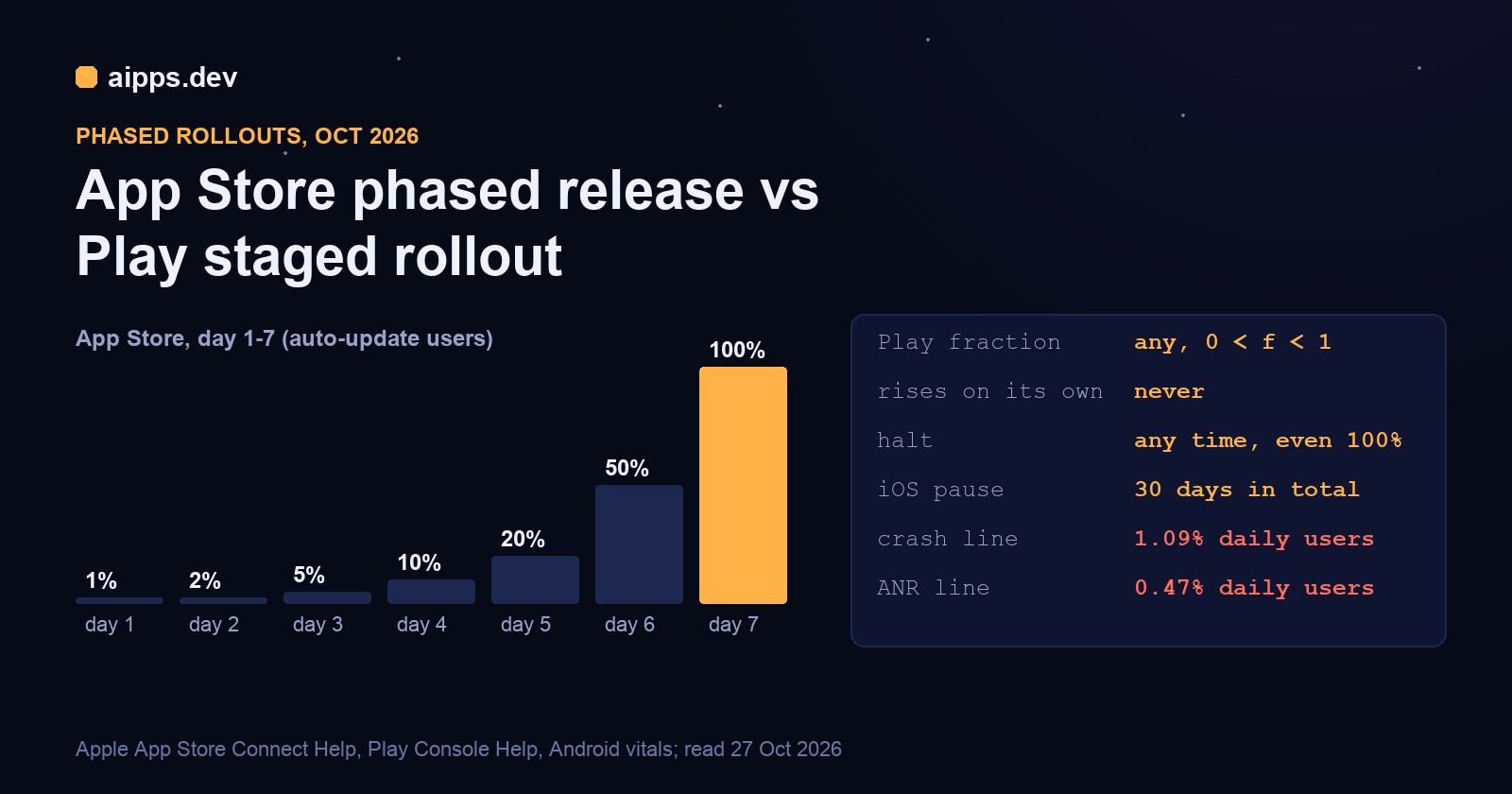
The biggest practical difference is the second row. On iOS a phased release reaches 100% by day 7 unless someone pauses it. On Play a 5% rollout stays at 5% for as long as you leave it, which is safer, and easy to forget about.
App Store: the 7-day schedule
Apple's App Store Connect Help gives the schedule as a share of users with automatic updates on eligible devices. Each day is a step up, and the percentages are cumulative: day 4 means 10% of auto-update users have been offered the version, not 10% more.
The example column is our own arithmetic for an app with 80,000 users who have automatic updates on, and it is an upper bound: an offered device still has to update, and people who rarely open the app or keep their phone off Wi-Fi lag behind. The schedule only governs automatic updates. Apple says apps in phased release "can be manually downloaded from the App Store by anyone at any time", so anyone who opens your product page and taps Update, and every new install, gets the new version on day 1. A phased release protects your quiet majority, not your most engaged users.
Pause, resume, release to all
You can pause "for up to 30 days, with no limit on the number of pauses". The 30 days are a total: pause for 10 days, resume, and 20 days of pause are left. A resumed release "will pick up on the day it was left off", so pausing on day 3 at 5% and resuming a week later continues at day 3, not day 10. Pausing stops new automatic updates only. Manual updates keep going, and forum reports from developers confirm installs still climb a little while paused.
Release to All Users ends the schedule at once: every device with automatic updates gets the latest version it supports. Use it when the first two or three days are clean and you have a reason to move faster, such as a server change that needs the new client.
What you can't do on iOS
There is no rollback. Once a version is live you can't put the previous build back, and every new version needs a higher version number. If day 2 shows a crash, the path is: pause the phased release, fix, raise the version or build, submit with a request for expedited review, and release the fix (phased or not). Removing the app from sale doesn't help either: Apple says phased release then stops and "won't be available for that version again", and when the app returns that version goes to all users at once. And phased release is for version updates only; a first release goes to everyone.
The API
The schedule lives on an appStoreVersionPhasedReleases resource tied to an App Store version. Its attributes are phasedReleaseState, currentDayNumber, startDate and totalPauseDuration; the states are INACTIVE (not started), ACTIVE, PAUSED and COMPLETE. You create it before release, PATCH it to pause, resume or release to everyone, and DELETE only cancels a planned phased release that hasn't started.
With fastlane, deliver (upload_to_app_store) takes phased_release: true, which sets this up for the version it submits.
Google Play: percentages you set
On Play you pick the fraction when you roll out the release, and Play's help is plain about the rest: "your app's staged rollout percentage won't increase automatically." In the Play Console it's Releases, Manage rollout, Update rollout; in the Publishing API it's the userFraction on a release in the inProgress state, any value with 0 < fraction < 1. Setting the rollout to 1 (100%) completes it.
Who gets it: new and existing users are "chosen at random for each new release rollout", and users aren't told they are in it. If you start a new release before the last one finished, Play uses the same user group, so the people who had the broken 5% get the 5% fix. Unlike iOS, users outside the fraction can't pull the update by hand from the store listing; they stay on the old version. Staged rollouts are for updates only, and you can limit a production rollout to some countries, but once it has started you can't remove a country.
A schedule for Play
Google doesn't prescribe percentages. We use Apple's steps on Play too, so a cross-platform release moves in lockstep and one dashboard compares like with like. Each step waits at least 24 hours and only advances when the gates in the next section pass:
Two rules from experience: don't take a step on a Friday afternoon (if it goes wrong, nobody is looking until Monday, and Play won't pause itself), and change the store listing only after the release reaches 100%, which is also what Play's help recommends when an update needs listing changes.
Halt and resume
Halt rollout stops new users getting the version: "no additional users will receive the app version", and those who already have it "will remain on that version". Halting has no time limit. You can resume a halted release at any percentage if it turns out to be a false alarm; otherwise ship a fix with a higher versionCode, which reaches the same user group first.
Since May 2025 you can also halt a release that is already at 100%. Play then serves the previous fully rolled-out release again to new users and to anyone who hasn't updated. It doesn't downgrade phones that already took the bad version, it doesn't work on the internal test track, you can't halt the first release on a track (there's nothing to fall back to), and a previous release with a policy violation can't stand in. Play's help adds the obvious warning: after a release has been out a long time and most users have it, a halt does little.
The API and fastlane
One more Play setting goes with a staged release: inAppUpdatePriority, 0 to 5 on the release, which your in-app update code can read to decide between a flexible and an immediate update prompt. It can't be changed once the release is rolled out, so set it when you create the release.
The crash thresholds to watch
Google publishes the lines it judges apps by. Android vitals calls an app's behaviour bad when its user-perceived crash rate reaches 1.09% of daily users across all devices, or 8% on a single device model; for the user-perceived ANR rate the lines are 0.47% overall and 8% per model. Play generally looks at the last 28 days, "may act sooner in the event of a spike", and an app over a line is likely to be less discoverable and may show a warning on its listing.
Those lines are the floor, not the gate for a rollout, because the overall rate dilutes a bad release. A worked example: your current version crashes for 0.4% of daily users and the new one for 5%. The overall rate is (1 - share) x 0.4% + share x 5%:
A release twelve times worse than the last one stays under Google's line until it reaches 15% of users, and on a 28-day view much longer. So the gate must compare the new release with the previous one, on the new release's own numbers. Play Console's release dashboard and Firebase Crashlytics both split crash-free users by version; App Store Connect shows crashes per version under App Analytics and Xcode Organizer.
How many users you need before you can tell
At 1% the counts are small. Same example, 80,000 users reached at full rollout, a healthy release at 0.3% crashing users and a bad one at 1.5%:
At day 1, 12 crashing users against an expected 2 or 3 is a clear signal; a release that is only twice as bad (0.6%, about 5 users) isn't distinguishable from noise until day 3. That's why the first step on Play waits for at least 1,000 daily users on the release, and why apps with fewer than about 20,000 users learn little from 1% and 2% and can start at 5%.
Our gates
These are the checks we run before each step, on both platforms. They are our rules, not the stores'; the Google and Firebase numbers in them are the published defaults.
A hold means: on iOS, pause the phased release; on Play, don't take the next step. A halt means: on iOS, pause and ship a fix; on Play, halt rollout and ship a fix with a higher versionCode, or resume if the signal was a false alarm. If the problem is in JavaScript only, an over-the-air update can fix the users who already have the version, and EAS Update has its own rollout percentage for that (see below).
A release week, both platforms
Pausing over the weekend spends about 4 of the 30 pause days per version and is the one thing a phased release can't do by itself: Apple's schedule doesn't know what day of the week it is.
Before you ship the first rollout
A staged release is only as good as the build that feeds it: the same build number has to go out on both stores, testers should have tried it on a real device, and the crash reporting has to be in the release binary from day 1. aipps.dev builds React Native, Android and iOS apps on our own Mac mini and gives every build a QR install page, so the release candidate gets a day on testers' phones before 1% of your users see it.
Build the release candidate on aipps.dev and put an install link in front of your testers before the rollout starts.
See aipps.devRelated: over-the-air updates in 2026, with EAS Update's own rollout percentage for JavaScript fixes, and TestFlight in practice for the beta stage before a phased release.
Sources, read 27 October 2026: Apple App Store Connect Help, "Release a version update in phases"; App Store Connect API reference (AppStoreVersionPhasedRelease, PhasedReleaseState, POST/PATCH/DELETE /v1/appStoreVersionPhasedReleases); Play Console Help, "Release app updates with staged rollouts" (answer 6346149) and "Halting a fully rolled-out release" (answer 16285429; reported by TuttoAndroid, 22 May 2025); Google Play Developer API reference, edits.tracks (Release: userFraction, status, inAppUpdatePriority, countryTargeting) and "APKs and Tracks"; Android Developers Help, Android vitals core vitals thresholds (answer 9844486); Firebase docs, Crashlytics velocity alerts; fastlane docs for upload_to_play_store and upload_to_app_store; Apple Developer Forums threads on installs during a paused phased release. The worked examples are our own arithmetic on example figures.