An over-the-air (OTA) update swaps the JavaScript bundle and assets of a React Native app without a new store build. A crash fix reaches users in minutes instead of waiting for App Review or a Play rollout. Since Microsoft retired App Center on 31 March 2025, CodePush is no longer a hosted service, so teams choose between Expo's EAS Update, a CodePush-compatible service, or hosting updates themselves. Below are the store rules that decide what you may ship this way, what each option costs at 10,000, 100,000 and 500,000 monthly users, how big an update really is (measured on our own app), and how each option rolls back a bad release.
What Apple and Google allow
Both stores allow downloaded code only when it runs in an interpreter or virtual machine and doesn't change what the reviewed app is. Apple's Developer Program License Agreement, section 3.3.1(B) "Executable Code", reads: "an Application may not download or install executable code. Interpreted code may be downloaded to an Application but only so long as such code: (a) does not change the primary purpose of the Application by providing features or functionality that are inconsistent with the intended and advertised purpose of the Application (b) does not bypass signing, sandbox, or other security features of the OS; and (c) for Applications distributed on the App Store, does not create a store or storefront for other Applications."
App Review Guideline 2.5.2 says apps may not "download, install, or execute code which introduces or changes features or functionality of the app". Apple does enforce this. In March 2026 it removed the vibe-coding app Anything from the App Store and cited 2.5.2 and 3.3.1(B), as 9to5Mac reported on 30 March 2026. That app generated and ran new apps inside itself. A team pushing a bug fix to its own app is in a different position, but the same clause applies to both.
Google Play's Device and Network Abuse policy says an app "may not modify, replace, or update itself using any method other than Google Play's update mechanism" and "may not download executable code (such as dex, JAR, .so files) from a source other than Google Play". It then adds: "This restriction does not apply to code that runs in a virtual machine or an interpreter where either provides indirect access to Android APIs (such as JavaScript in a webview or browser)." A React Native bundle (JavaScript, or Hermes bytecode run by the Hermes VM) reaches Android APIs only through the native modules already in the reviewed build, which is why OTA updates fit under this exception. Neither store has published a separate rule on Hermes bytecode. EAS Update and CodePush have shipped it to store apps for years.
In practice, the line falls here:
The native rows aren't policy choices. A bundle that calls a native module missing from the installed binary crashes. That's why every OTA system tags builds and updates with a runtime or binary version and serves an update only to builds that match it.
CodePush after App Center
Three things happened to CodePush in 2025. App Center, which hosted it, closed on 31 March 2025. Microsoft published a standalone code-push-server repo so teams could host CodePush themselves, then archived that repo, along with the react-native-code-push client, on 20 May 2025. Both are now read-only. The client's README says it won't support the New Architecture, and React Native 0.82 and later run only on the New Architecture, so the original client can't be used on a current app (our test app below is on React Native 0.88).
What replaced it:
If your app already calls codePush.sync(), switching to a CodePush-compatible service mostly means changing the server URL and deployment keys. Moving to EAS Update or Hot Updater means replacing the client library and your release scripts. Hot Updater's licence adds one condition to MIT: if you offer its server or console as a hosted service to others, you must show "Powered by hot-updater". Running it for your own apps needs no notice.
What it costs at 10,000, 100,000 and 500,000 users
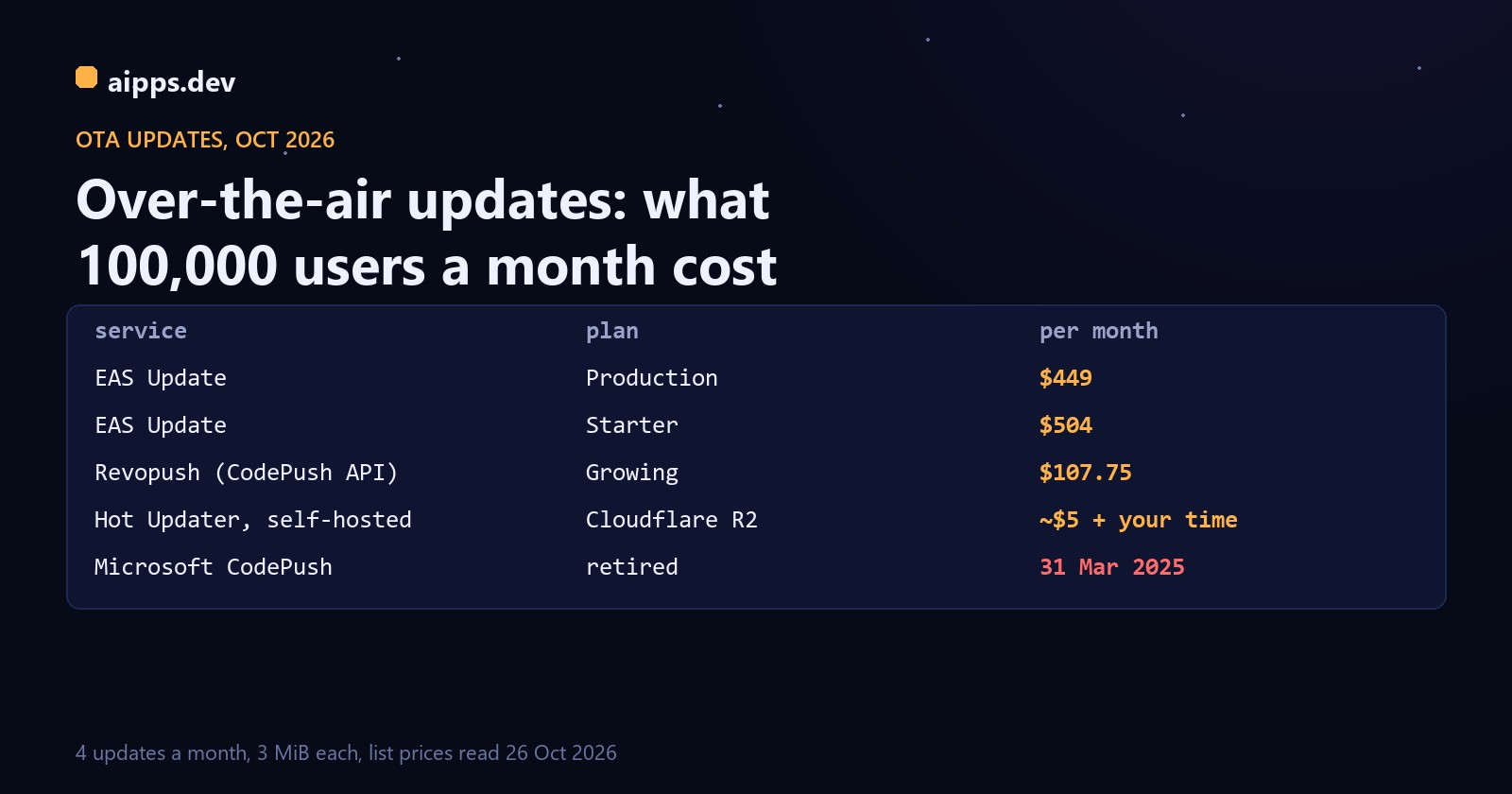
All three hosted options bill by monthly active users (MAU), meaning devices that download at least one update in the month. Expo counts "a unique installation of your app on a device" once per billing period, however many updates it downloads. Users who download nothing aren't counted.
Expo's overage tiers above the included users are $0.005 per MAU up to 200,000, $0.00375 from 200,001 to 500,000, $0.0034 to 1,000,000, $0.003 to 2,000,000, and lower bands down to $0.00085 above 100,000,000. Each band applies only to the users inside it.
A worked example: an app that ships 4 updates a month, each a full 3 MiB download (between our 0.56 MiB test app below and the 5 MiB Expo uses in its own billing examples). Every active user downloads 4 x 3 = 12 MiB a month.
Three things stand out. Bandwidth costs nothing on EAS here, because each user above the included count brings 40 MiB of allowance and this app uses 12 MiB per user. Bandwidth only appears on an EAS bill once you ship more than about 30 to 40 MiB per user per month. On EAS the bill is driven by users. Production becomes cheaper than Starter at 39,000 MAU (19 + 36,000 x $0.005 = $199), and above 50,000 Starter costs exactly $55 a month more. Revopush is about a quarter of EAS Production at 100,000 users and under a fifth at 500,000 (gigabytes counted as 1,000 MB, GiB converted at 1.0737).
The self-hosted line counts Cloudflare fees only. We assume each user opens the app 30 times a month and each launch makes one update check: 300,000, 3 million and 15 million requests. Workers' free plan allows 100,000 requests a day. The $5 paid plan includes 10 million a month and charges $0.30 per extra million. R2 egress is free, storage is $0.015 per GB-month after 10 GB free, and bundle downloads stay within the 10 million free Class B reads. The fees are small. The real cost is the time spent running, monitoring and upgrading an update server that your users' app launches depend on.
How big an update is: our own test
We exported our hello-aipps test app (Expo SDK 58, React Native 0.88, 616 modules, Hermes) with npx expo export, the same step eas update runs before uploading, on 26 October 2026. Then we changed one line of text and exported it again.
Two results matter here. A one-line change rewrites 77% of the bytecode at the same positions, because the offsets after the edit shift. Without patches, every update is a full re-download, about 0.57 MB with Brotli even for this tiny app. A binary delta brings that down to 8.2% of the compressed bundle. We used git's pack delta as a stand-in because no bsdiff tool was installed. EAS Update now serves bsdiff patches: on by default from SDK 56 (opt-in with updates.enableBsdiffPatchSupport on SDK 55), and on SDK 58 with EAS Build it can also patch from the bundle embedded in the build. Expo's limits: a patch is precomputed only against the second-newest update on the channel, takes a few minutes to generate after publishing, and is served only when it is meaningfully smaller. Hot Updater lists bundle diffing too. Unchanged images and fonts aren't downloaded again with any of the three.
For the cost table above, patches mainly matter if you ship often or have a large bundle. A 10 MiB bundle shipped 8 times a month is 80 MiB per user without patches, which puts an EAS bill into paid bandwidth. With patches of about 8% it's under 7 MiB.
Rollouts and rollback
A minimal EAS Update release flow, with the build's channel set in eas.json ("channel": "production" under the production build profile):
Use the fingerprint policy. The appVersion policy changes the runtime version only when you bump the app version, so a native change shipped without a version bump will receive JS updates it can't run. Fingerprint hashes everything that affects the native runtime. You'll make store builds more often, but an incompatible update can't reach a device. Only one rollout can run per branch, platform and runtime version, and a new rollout can't replace an active one until you finish or revert it (or pass --force-end-active-rollout, EAS CLI 24.9.0+).
The automatic rollback covers less than it seems. expo-updates only recovers from a fatal JS error in the first 10 seconds of a new update's first launch, before the app reports that content appeared. After that, it can only fix forward: it waits 5 seconds for a newer update, otherwise the app crashes. Expo also warns that rolling back can be unsafe if the bad update changed stored data in a way the old code can't read. Staged rollouts, and a fix you can publish fast, protect you more than the automatic rollback does.
Which one to pick
Whatever you pick, OTA updates only cover JavaScript, and the last row of that table still needs a signed build, a TestFlight or Play test track and a store review. Build minutes are priced separately. Our comparison of what iOS and Android builds cost on CI in 2026 covers that side. For the review and test step, see TestFlight in practice: tester limits, 90-day build expiry and beta review.
When a fix needs native code, it needs a new build. aipps.dev builds React Native, Android and iOS apps and gives every build a QR install page, so testers can check the native release while your OTA updates keep the JavaScript current.
See aipps.devSources, read 26 October 2026: Apple Developer Program License Agreement, section 3.3.1(B) Executable Code (developer.apple.com/support/terms); App Review Guidelines 2.5.2 and 4.7; 9to5Mac, "Apple steps up crackdown on vibe coding apps" (30 March 2026); Google Play Console Help, Device and Network Abuse (support.google.com/googleplay/android-developer/answer/9888379); Expo pricing (expo.dev/pricing) and docs: Usage-based pricing, Rollouts, Rollbacks, Error recovery, Runtime versions, Optimize assets, Bundle diffing (docs.expo.dev/eas-update); Revopush pricing (revopush.org/pricing) and docs (docs.revopush.org); GitHub: microsoft/code-push-server and microsoft/react-native-code-push (archived 20 May 2025), CodePushNext/react-native-code-push, gronxb/hot-updater; Cloudflare R2 pricing (developers.cloudflare.com/r2/pricing) and Workers pricing. Bundle sizes: our own npx expo export of hello-aipps (Expo SDK 58, React Native 0.88), 26 October 2026.