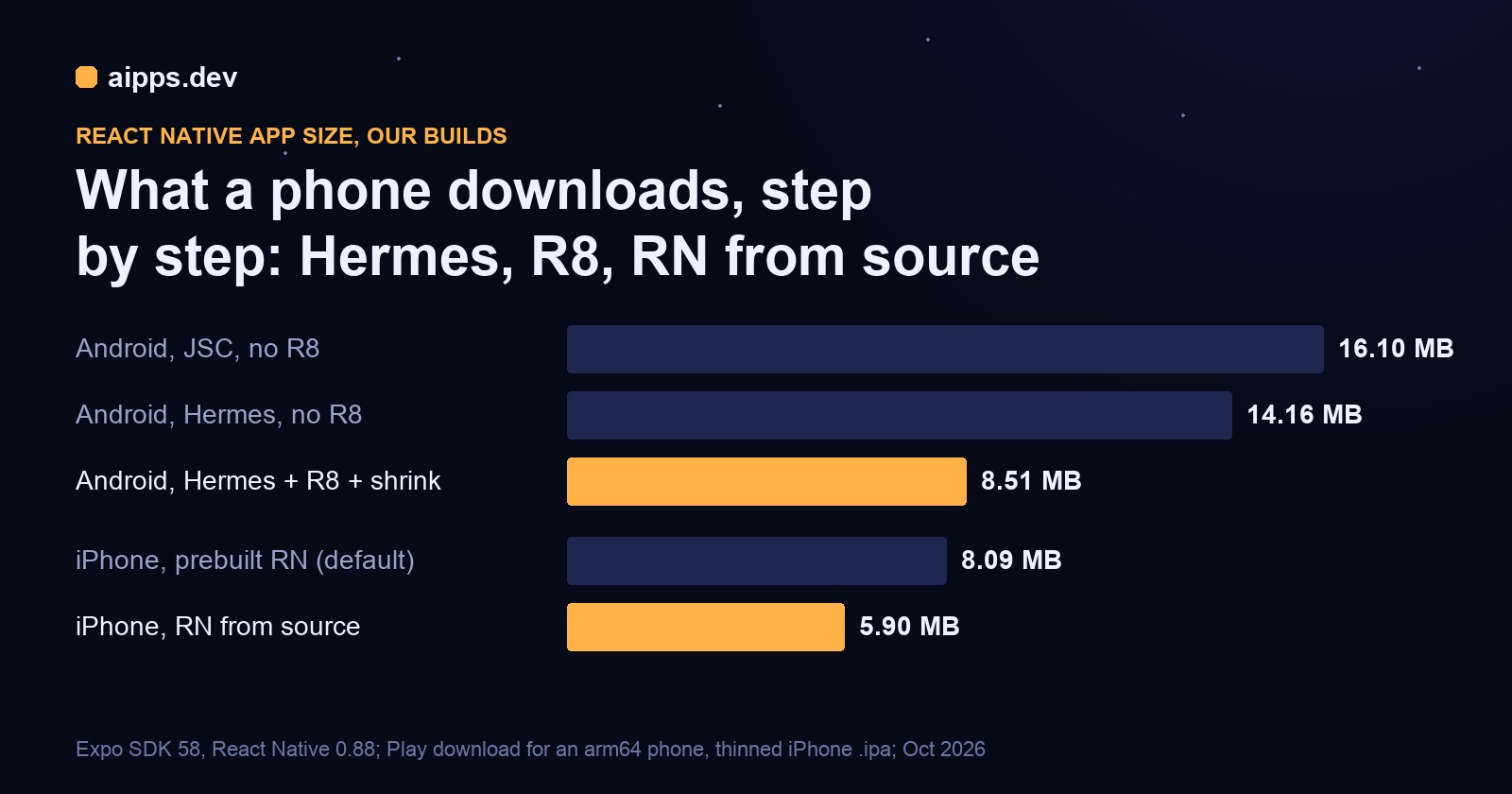
Most advice on React Native app size is a list of switches: turn on Hermes, turn on R8, split by ABI. What it rarely says is how many megabytes each switch is worth, or which number to look at. So we built the same small app again and again, changing one setting at a time, and measured what a phone actually downloads and installs. On Android the download went from 16.10 MB to 8.51 MB. On iPhone it went from 8.09 MB to 5.90 MB, with a trade-off most teams don't know they're making.
The app is a one-screen Expo app (Expo SDK 58.0.17, React Native 0.88.0, React 19.3, New Architecture on), the same JavaScript in every build. Android: AGP 9.2.1, Gradle 9.4.1, NDK 27.1, Kotlin 2.2, minSdk 24, built in release mode and measured with bundletool 1.18.1. iOS: Release archives with Xcode 27.0 on a Mac mini, exported ad hoc with app thinning for all variants. All builds were made on 25 and 26 October 2026. MB in this article is 1,048,576 bytes (the exact bytes are in the tables); where Apple's App Thinning report is quoted, its MB is 1,000,000 bytes and we say so.
Android: the per-step table
Each row changes one thing from the row above. Rows 1 to 3 are Android App Bundles (AAB), the format Play requires; row 4 is a plain APK built for one ABI, the kind you send to testers by link.
"Play download" is what bundletool's get-size total reports for an arm64 phone (Android 15, 420 dpi, English): the compressed bytes Google Play sends that device. "Installed" is the sum of the split APKs Play would put on it (the base, the arm64 native code, English strings and xxhdpi resources). The universal APK holds all four ABIs, which is what you get from assembleRelease with no splits.
Two numbers to take away. Hermes plus R8 roughly halves what a user downloads from Play (16.10 to 8.51 MB, -47%) and the space the app takes on the phone (45.30 to 21.98 MB, -51%). And if you hand out APKs yourself, building one per ABI cuts the file a tester downloads from 63.72 MB to 19.99 MB (-69%).
Don't judge size by the AAB
The AAB on your disk is the wrong number to watch. About a third of each bundle is BUNDLE-METADATA that no user ever downloads: native debug symbols for all four ABIs (15.1 MB stored, 52 MB raw) and, once R8 is on, its 36 MB mapping file. Play keeps both so crash reports can be symbolicated and deobfuscated. That is why turning R8 on made the AAB only 7% smaller while the Play download fell 40%.
Step 1 to 2: what Hermes changes, and what it doesn't
Switching from JavaScriptCore (JSC) to Hermes saved 1.94 MB of download and 6.73 MB of installed size. Almost all of it is the engine library, not your code:
The bytecode is 14% bigger than the minified JS it replaces and compresses about half as well, so for an app with a large bundle Hermes gives some of its saving back. The library difference (about 7 million bytes per ABI) is fixed, so Hermes wins on size for any normal app, but the reason to use it is start-up time: the phone runs precompiled bytecode instead of parsing JavaScript at launch. We measured size only, not start-up.
If you are on a current Expo or React Native template you already have Hermes. JSC is now a community package: in our SDK 58 build, setting jsEngine to "jsc" in app.json no longer changed the Android build; we had to set hermesEnabled=false in gradle.properties and add the io.github.react-native-community:jsc-android dependency. Nobody needs to go back; it's here as the baseline.
Step 2 to 3: R8 and resource shrinking
R8 removes Java and Kotlin classes and methods the app never calls, then renames and optimizes what's left. resource shrinking then drops drawables and layouts nothing references. In our build:
That 5.65 MB per download is the single biggest step in this article, bigger than Hermes. Expo SDK 58's template already turns R8 on; resource shrinking stays off until you ask for it. In a bare React Native project, or to set both explicitly, it is two lines in android/gradle.properties for an Expo app (the prebuild reads them) or the release block in android/app/build.gradle:
What it costs: R8 can't see code that's only reached by reflection, so a library or your own native module that looks classes up by name can crash in release builds while debug builds work. Most React Native libraries ship their own consumer keep rules; our sample built with R8 and no extra rules (we measured size, not behaviour on a device, so test your release build before shipping it). When something does break, the release crash names the missing class; add a keep rule for it in proguard-rules.pro rather than turning R8 off:
The other cost is the mapping file: crash stack traces from an R8 build are obfuscated until they're matched with the mapping.txt from that exact build. In an AAB it travels inside the bundle (that's the 36 MB above) and Play uses it automatically; for APKs you send yourself, keep each build's mapping.txt next to the APK. Teams that switched R8 off after one reflection crash are paying about 5.6 MB on every install of an app like ours.
Step 3 to 4: ABI splits, and when they matter
Native code is the largest part of a React Native APK. With Hermes, each ABI carries about 15.5 MB of raw .so files (libreactnative.so alone is 7.05 MB on arm64), and a universal APK carries four sets: arm64-v8a, armeabi-v7a, x86_64 and x86.
On Google Play you don't need ABI splits. The AAB already lets Play send each phone only its own ABI, which is why our Play download for an arm64 phone is 8.51 MB while the universal APK is 63.72 MB. ABI splits matter when you distribute APKs yourself: install links for testers, a sideloaded build, another store. There, one arm64-v8a APK was 19.99 MB against 63.72 MB for the universal one.
Three caveats. An arm64-only APK won't install on an old 32-bit phone or an x86_64 emulator, so keep armeabi-v7a in the list if your testers have older devices. If you publish per-ABI APKs to a store that isn't Play, each needs its own versionCode (Android's split docs show the pattern). And the 19.99 MB arm64 APK is still bigger than the 8.51 MB Play download, because in an APK the .so files are stored uncompressed and page-aligned so Android can load them straight from the file; Play compresses them for the transfer.
Since native libraries come up: that page alignment is also what Android's 16 KB page-size rule checks. Our 16 KB check tool reads every .so in an APK and tells you whether it's ready, and the 16 KB article covers the 1 February 2027 deadline.
iOS: prebuilt React Native vs compiled from source
On iOS there's no R8 and no ABI split: App Store builds are arm64 only, and bitcode has been gone since Xcode 14. The step that moved the number was how React Native itself is linked.
Expo SDK 58 installs React Native and its own modules as prebuilt dynamic frameworks by default, which makes clean builds much faster. The catch is that a dynamic framework keeps every symbol, because the linker can't know which ones your app will call. Compiled from source, the same code becomes static libraries linked into the app binary, and the Release build's dead-code stripping drops whatever the app never calls:
Result: the iPhone download falls 27% (8.5 to 6.2 MB in Apple's report) and the installed size 42% (29.8 to 17.2 MB). To build that way, set two variables when you install pods:
What it costs: every clean build now compiles React Native's C++ and Objective-C (in our case the archive went from 2m 22s to 2m 45s with a warm cache; a cold CI machine pays much more), and the dSYMs you upload for crash reports grow from about 27 MB to about 128 MB because React Native's own debug info is now yours. For a release pipeline that builds a few times a day that's a fair price for 2.3 MB off every download; for preview builds on every pull request, keep the prebuilt default.
JSC on iOS and app thinning
We wanted a JSC row for iOS too and couldn't build one: with Expo SDK 58, switching to the community JavaScriptCore package fails in Expo's own module layer (ExpoModulesJSI includes hermes/hermes.h). So there is no JSC IPA number here, and we won't guess one. What we can say from build 1: a JSC build would drop hermesvm.framework (1.74 MB compressed in the .ipa) because iOS ships JavaScriptCore with the system, and would carry plain JS instead of bytecode.
App thinning did very little for this app. The iPhone and iPad variants were the same size (8,486,166 and 8,486,306 bytes); thinning only cut the asset catalog from 1,261,912 to 639,896 bytes by keeping one set of icon renditions. With arm64-only code and no bitcode, thinning mostly helps apps with lots of images in asset catalogs.
The size a user sees, worked through
Take step 1 against step 3 on Android. Each arm64 install from Play downloads 16.10 - 8.51 = 7.59 MB less. At 10,000 installs a month that's 75,900 MB, about 74 GB of your users' data not spent, and each phone keeps 23.32 MB more free space (45.30 - 21.98 MB installed). For testers installing from a link, the move from the universal APK (63.72 MB) to the arm64 APK (19.99 MB) saves 43.73 MB per tester per build: a team sending two builds a day to 20 testers stops pushing about 1.7 GB a day through their phones.
On iPhone the same sums are smaller, because the App Store already sends only the thinned variant: 8.5 to 6.2 MB per download in Apple's figures, 2.3 MB saved, for the cost of slower clean builds.
The checklist, in the order that pays
Measure your own app before and after each change the same way: bundletool build-apks on your AAB, then get-size total with a device spec for the phone you care about, and on iOS the App Thinning Size Report that xcodebuild -exportArchive writes when thinning is on. The AAB and the universal .ipa on your disk will mislead you; the per-device numbers won't.
aipps.dev builds React Native, Android and iOS apps and shows the app file and its size on every build, so a change that adds megabytes shows up in the next build, not in a store review. Every build gets a QR install page for testers.
See aipps.devRelated: what iOS and Android builds cost on CI in 2026, and installing a test build from a QR code, where an arm64-only APK makes the download quicker for testers.
Sources (read 26 October 2026): Android Developers, "Shrink, obfuscate, and optimize your app" (developer.android.com/build/shrink-code), "Build multiple APKs" (developer.android.com/build/configure-apk-splits: publish an app bundle to Play, which serves each device optimized APKs; universalApk), "About Android App Bundles" (developer.android.com/guide/app-bundle) and bundletool (developer.android.com/tools/bundletool); React Native docs, "Using Hermes" (reactnative.dev/docs/hermes); Apple, "Reducing your app's size" (developer.apple.com/documentation/xcode/reducing-your-app-s-size) and the Xcode 14 release notes (bitcode deprecated). All sizes are from our own builds of one sample app on 25 and 26 October 2026; your app's numbers will differ with its native modules, assets and bundle size, but the order of the steps holds.