Google Play has required apps that target Android 15 (API level 35) or higher to support 16 KB memory pages on 64-bit devices since November 2025, with extensions handed out in Play Console. The extensions are ending: Android's developer guide now says that starting 1 February 2027, if your app updates don't support 16 KB page sizes, you won't be able to release them. New apps and updates have had to target API 36 since 31 August 2026 (1 November with an extension), so the 16 KB rule now covers every app that is still being updated.
This is how to tell whether your APK is ready, including a check that passes when it shouldn't, our own test of real APKs, and what to upgrade in React Native, Expo and Flutter projects.
Does it affect your app?
Only native code is affected: any .so file in the APK's lib/ folder, whether you wrote C/C++, pulled in an SDK that ships one, or use a framework that does. Pure Java and Kotlin apps already work on 16 KB devices. In practice that means almost every cross-platform app is affected: React Native ships Hermes and its own native libraries, Flutter ships libflutter.so, and many popular SDKs (image, video, database, crypto) carry native code too. Unzip your APK and look at lib/arm64-v8a/: if there's anything there, read on.
Why Google is doing it: in Google's own testing, 16 KB devices launched apps 3.16% faster on average under memory pressure (up to 30% for some apps), drew 4.56% less power during app launch, started the camera 4.48% faster hot and 6.60% faster cold, and booted about 8% (roughly 950 ms) faster.
Our test: three apps, five APKs
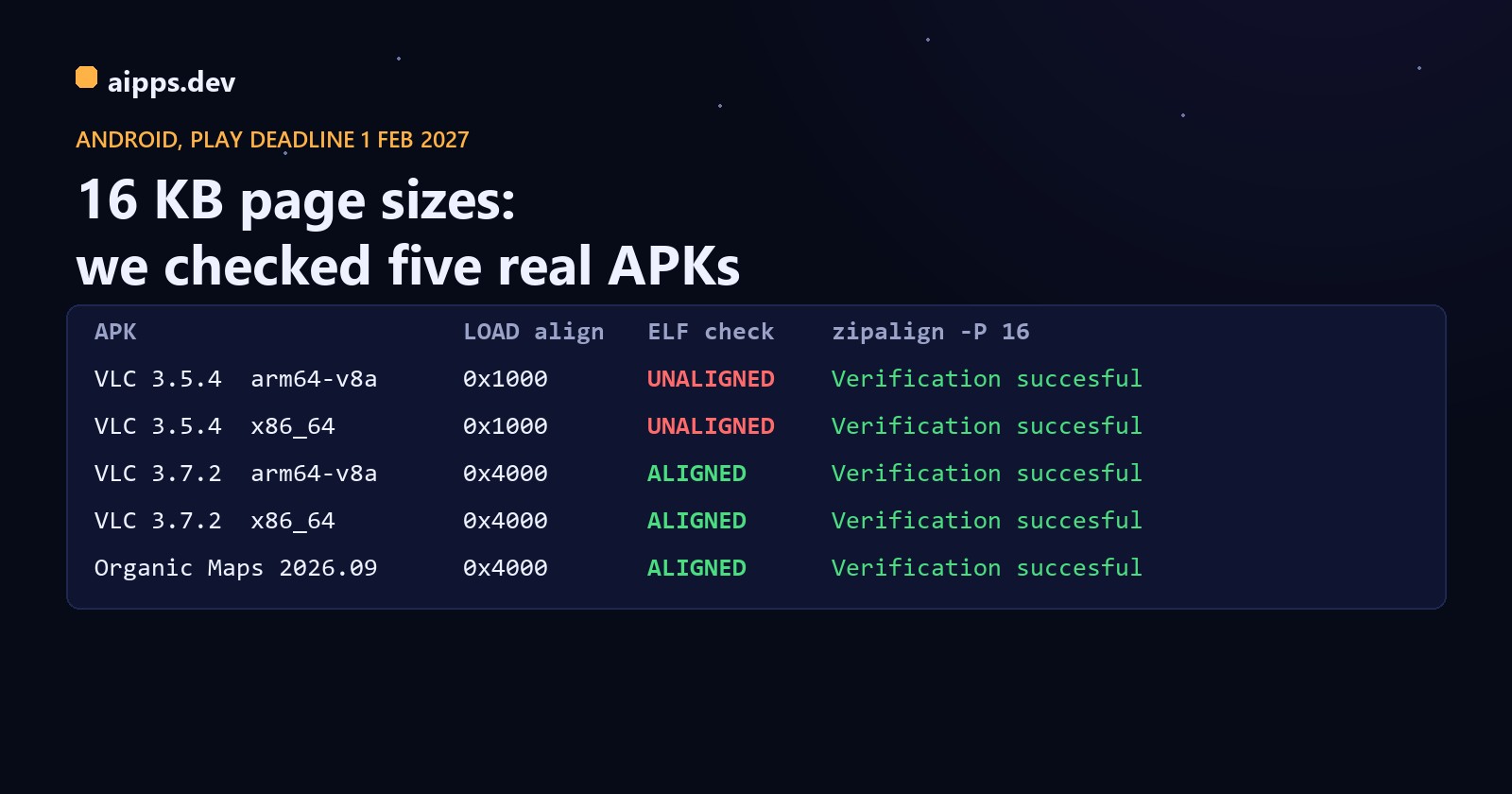
We took real, published APKs from F-Droid and checked every native library: the alignment of each ELF LOAD segment (it must be 16384, written 0x4000 or 2**14), and, for libraries stored uncompressed, whether the file starts on a 16 KB boundary inside the zip. Only 64-bit libraries count for the rule; 32-bit armeabi-v7a and x86 libraries are listed but not judged.
The old VLC is what a not-yet-migrated app looks like: every 64-bit library linked with 4 KB segments. The new one was rebuilt and every segment moved to 16 KB. llvm-readelf from the NDK shows the difference directly:
The check that passes when it shouldn't
Many guides tell you to run zipalign's 16 KB check and look for "Verification successful". We ran it on all five APKs:
It passes the unaligned VLC because zipalign checks where files sit inside the zip, not how the libraries inside were linked. Its -P 16 option only matters for libraries stored uncompressed (the Android Gradle Plugin's default for apps with minSdk 23 or higher), which the system maps straight out of the APK. These F-Droid builds compress their libraries, so there is nothing for zipalign to check, and it says yes. The two checks answer different questions, and you need both:
A checker you can run anywhere
check_elf_alignment.sh from Google needs Linux or macOS and the NDK. This Python script (standard library only, Windows too) does both checks for every library in an APK; it's what produced our table:
Run it on the APK you actually ship. For an app bundle, build the APKs from it first with bundletool (build-apks, then unzip the arm64 split): Google notes that with AGP 8.3 to 8.5, bundletool doesn't zipalign APKs by default, so an app can look fine locally and fail to install when Play builds it from the bundle.
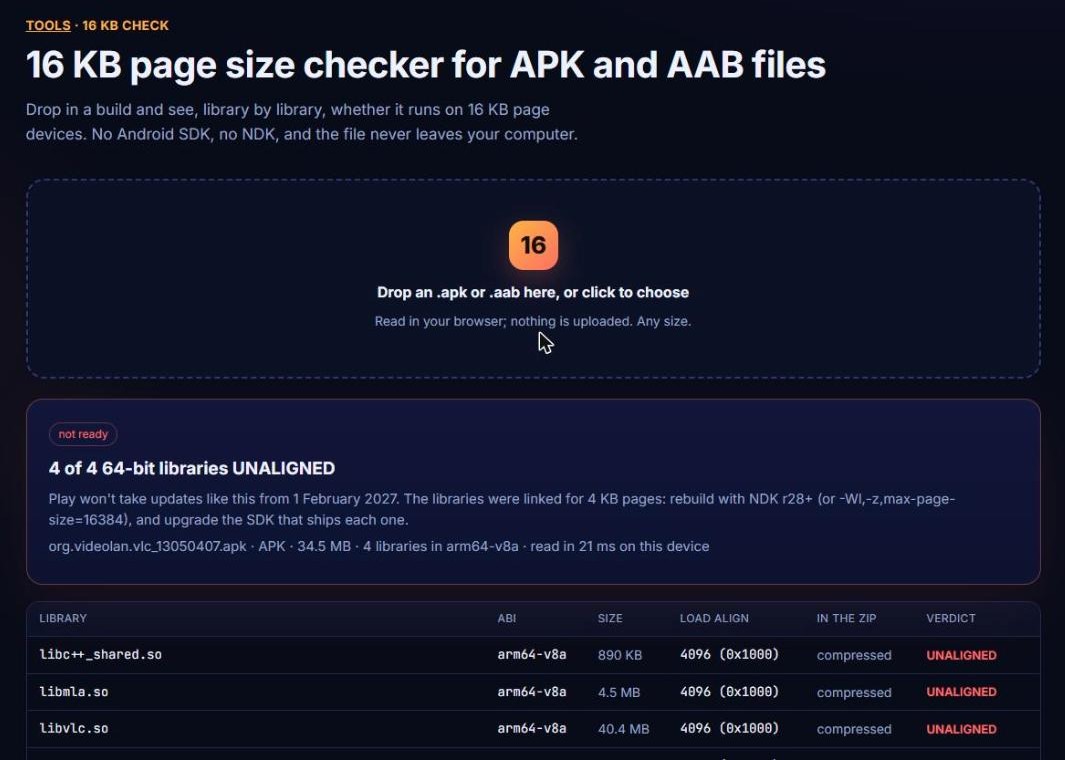
No Python to hand? The same two checks run in the browser on our 16 KB page size checker: drop an APK or AAB and it lists every native library with its LOAD alignment, where it sits in the zip and a verdict. The file is read on your computer and never uploaded, so a 200 MB release build is fine.
How to fix it
The framework upgrade is usually the smaller part. The holdouts are third-party native SDKs that you don't compile: an analytics or payments SDK pinned to an old version, or a .so committed to the repo years ago. Run the checker, list every UNALIGNED library, and map each one to the dependency that brings it in. If you can't upgrade the AGP, Google's fallback is useLegacyPackaging = true under packagingOptions jniLibs, which compresses the libraries (as F-Droid's builds above do): it removes the zip-alignment question but not the ELF one, and makes the installed app bigger.
Testing on a 16 KB device
Install the build, open every screen that loads native code (camera, video, maps, database, anything with a native SDK) and watch logcat for dlopen errors. On Android 16, unaligned apps may run in a compatibility mode with a warning on launch; don't take a launch that works as proof, the checker is.
aipps.dev builds your React Native or Android app on a current NDK and AGP, and every build gets a QR install page so the 16 KB test phone can install it in seconds.
See aipps.devRelated: the 2026 store deadlines calendar puts this date next to the API 36 and Xcode 26 requirements, and what iOS and Android builds cost on CI in 2026 for the machines that have to run the newer toolchain.
Sources: Android Developers, "Support 16 KB page sizes" (Play requirement, 1 February 2027 date for updates, AGP and NDK versions, linker flags, test devices, performance figures), read 23 October 2026; Android Developers, target API level requirements; React Native 0.77 release (21 January 2025); flutter/flutter issues 150168 and 175599. Test: F-Droid APKs org.videolan.vlc 13050407, 13050408, 13070206, 13070208 and app.organicmaps 26092932, downloaded 23 October 2026; zipalign from build-tools 35.0.0, llvm-readelf from NDK 27.1, and the script above.