You upload an iPhone build and a few minutes later App Store Connect emails you ITMS-91053: Missing API declaration, or refuses the build with ITMS-91061: Missing privacy manifest. In a React Native app you rarely wrote the code that caused it: it sits in react-native itself and in the native side of your npm packages. This guide covers what Apple checks, the exact email texts, which React Native and Expo modules use which required-reason APIs (from our own scan of 53 packages), and a PrivacyInfo.xcprivacy that covers them.
How we tested: on 29 October 2026 we made a fresh app with create-expo-app (Expo SDK 58, React Native 0.88.1) and added 20 common modules with npx expo install. A script then grepped every package's iOS source (.m, .mm, .swift, .h, .c, .cpp; test folders skipped) for the APIs on Apple's list and read every PrivacyInfo.xcprivacy the packages ship. We also read the code that merges these files at pod install. This is a source scan, not an App Store upload: it shows which categories each package can trigger. The Apple wording below is quoted from Apple's documentation and from emails developers have posted.
What Apple checks: five API categories and their reason codes
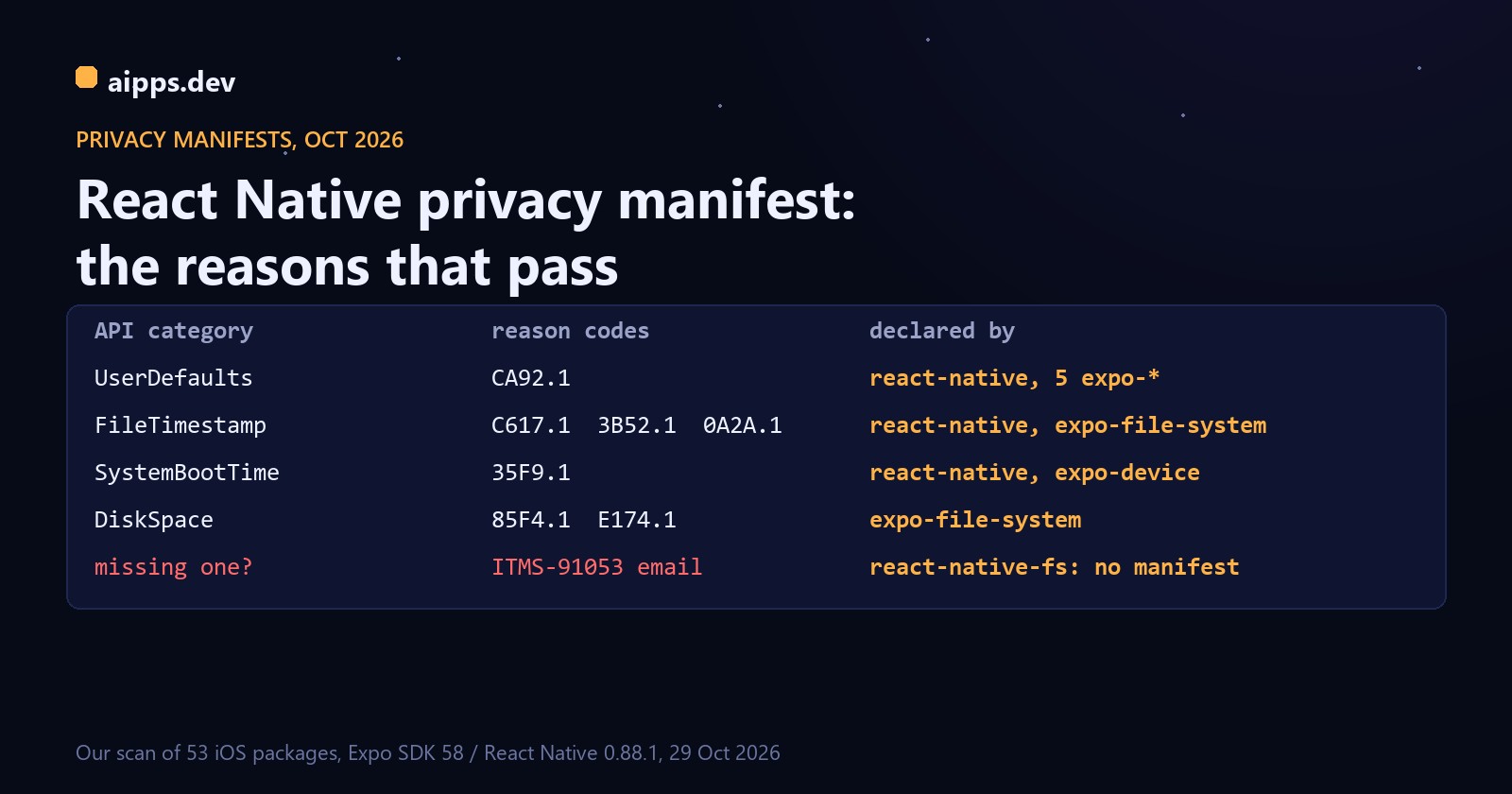
Apple calls these required reason APIs: calls that could be used to fingerprint a device. If your binary calls one, the app's privacy manifest must name the category and at least one approved reason. Since 1 May 2024 App Store Connect doesn't accept apps that use them without one. The full list as of 29 October 2026, from Apple's NSPrivacyAccessedAPIType documentation:
Two rules matter for React Native. First, the manifest belongs to the bundle that contains the code. With CocoaPods' default static linking, all your pods are compiled into the app's own executable, so their API use is checked against the app's PrivacyInfo.xcprivacy; a dynamic framework needs its own. Second, the reasons are a promise about what you do with the data: CA92.1 means you only read what your own app wrote, C617.1 that you only look at files inside your container.
The two emails, word for word
ITMS-91053 comes after an upload that uses a category the manifest doesn't declare. The version developers posted before the deadline read:
The useful parts are the file name in quotes (your app's executable, or a framework inside it) and the category list at the end: fix exactly those categories. Since May 2024 the same finding stops the upload instead of being a reminder.
ITMS-91061 is about third-party SDKs, not your code. Since 12 February 2025 a new app, or an update that adds one, can't include an SDK from Apple's list of commonly used SDKs unless that SDK ships its own privacy manifest. A posted example:
Your own manifest can't fix ITMS-91061; only a version of the SDK that ships PrivacyInfo.xcprivacy can. On Apple's list, read 29 October 2026, the SDKs a React Native app is most likely to carry are hermes, the Firebase pods (FirebaseCore, FirebaseMessaging, FirebaseCrashlytics, FirebaseInstallations, GoogleUtilities, GoogleDataTransport, nanopb, FBLPromises, Promises), FBSDKCoreKit and FBSDKLoginKit, GoogleSignIn, AppAuth, GTMAppAuth, GTMSessionFetcher, OneSignal, SDWebImage, Lottie, RealmSwift, Starscream, BoringSSL / openssl_grpc, Protobuf, leveldb and Abseil. The usual cause is an old version pinned in Podfile.lock or a binary someone vendored by hand.
Which React Native and Expo modules use which APIs
What our scan found. "uses" is what the native source calls; the last column is the module's own PrivacyInfo.xcprivacy. Of 53 packages with iOS code, 14 call a required-reason API and 11 ship a manifest. The other 39, among them react-native-reanimated, react-native-screens, react-native-svg, react-native-webview, expo-image, expo-router and expo-camera, call none of them in their own source.
Watch the last three. expo-updates keeps a config override in UserDefaults.standard; @react-native-firebase/app keeps its preferences in UserDefaults; react-native-fs reads NSFileCreationDate and NSFileModificationDate for stat() and NSFileSystemFreeSize for getFSInfo(). None of them ships a manifest, so those uses are declared only if another package or your own file already covers the category.
Some calls a grep of node_modules can't see. The Hermes engine, MMKV core (react-native-mmkv 4 pulls in the MMKVCore pod) and the Sentry and Firebase native SDKs arrive as pods or prebuilt binaries at pod install, with their own manifests. After pod install, find ios/Pods -name PrivacyInfo.xcprivacy lists every manifest in the build.
How the app manifest is put together at pod install
Expo's guide warns that Apple doesn't reliably read the PrivacyInfo files of static CocoaPods dependencies, so a pod's manifest alone may not satisfy the check on your executable. React Native works around this. In 0.88.1, react_native_pods.rb has privacy_file_aggregation_enabled on by default, and Expo's Podfile template turns it off only if Podfile.properties.json sets apple.privacyManifestAggregationEnabled to false. At pod install, scripts/cocoapods/privacy_manifest_utils.rb:
Step 2 is the catch: only pods that list their manifest in resource_bundles count. All 11 manifest-shipping packages in our scan do (expo-constants' podspec, for example, has 'ExpoConstants_privacy' => ['PrivacyInfo.xcprivacy']); a package with no manifest adds nothing. On Expo, ios.privacyManifests from app.json is written into the same file during prebuild, before pod install, so your entries and the merged ones end up together.
Worked example 1: a default Expo app
The default template brings react-native, expo-constants, expo-device, expo-system-ui and, through the expo package itself, expo-file-system. Running the same merge on our scan results gives the manifest below: four categories, seven reasons. The template's other iOS modules call none of the APIs, so nothing is left undeclared and this app should not get an ITMS-91053 email.
One quirk: 0A2A.1 comes from expo-file-system's manifest, and Apple says only third-party SDKs may declare it, yet the merge copies it into the app's file. If you write the file by hand instead, keep C617.1 and 3B52.1 (and DDA9.1 if you show file dates) and leave 0A2A.1 to the module.
Worked example 2: a bare React Native app with react-native-fs
Take a React Native CLI app without Expo, with @react-native-async-storage/async-storage and react-native-fs. The merge gives react-native's three entries plus async-storage's FileTimestamp C617.1. react-native-fs adds no manifest but calls NSFileSystemFreeSize, a DiskSpace API, and nothing declares DiskSpace: the upload gets ITMS-91053 naming NSPrivacyAccessedAPICategoryDiskSpace. FileTimestamp is already covered by C617.1, which fits if you only stat files in your own container. Add DiskSpace with E174.1 if the app checks free space before writing, or 85F4.1 if it shows free space to the user:
Put it in the NSPrivacyAccessedAPITypes array of ios/<YourApp>/PrivacyInfo.xcprivacy. The next pod install keeps it, because the merge starts from your file.
A manifest that passes, step by step
For an Expo app (prebuild or continuous native generation), declare everything in app.json so it survives every prebuild. This one covers the default template plus expo-updates and react-native-fs:
Then check before you upload:
Any category that step 2 turns up and step 3 lacks is your next ITMS-91053. Last, archive in Xcode (Product > Archive) and choose Generate Privacy Report in the Organizer: it shows the manifests of every bundle merged, and it is what you copy into the App Privacy answers in App Store Connect. That covers the other half of the manifest, NSPrivacyCollectedDataTypes, which this article doesn't go into.
When the email still arrives
Expo's guide suggests one more route: upload once, read the email, and add exactly the categories it lists; the email usually comes within minutes. It works, but each round costs a full release build and upload, and the scan above finds the same gaps before the build.
For the rest of the iPhone upload path, see Code signing for React Native teams: certificates, profiles and upload keys and TestFlight in practice: tester limits, 90-day build expiry and beta review.
Build your React Native or Expo app on aipps.dev: prebuild and pod install run on our Mac builders, so the manifests are merged as described here, and aipps build -p ios --submit sends the build to TestFlight.
Open the consoleSources: Apple, Describing use of required reason API and NSPrivacyAccessedAPIType (categories, APIs and reason codes), read 29 October 2026; Apple, Third-party SDK requirements (the SDK list), same day; Expo docs, Privacy manifests guide (ios.privacyManifests, the static pods note); ITMS-91053 and ITMS-91061 email texts as posted on the Apple Developer Forums (threads 748765 and 774634); react-native 0.88.1 scripts/cocoapods/privacy_manifest_utils.rb and react_native_pods.rb, expo-template-bare-minimum 58.0.30 Podfile, @expo/config-plugins ios/PrivacyInfo.js; our scan of a create-expo-app project (Expo SDK 58, React Native 0.88.1) with 20 added modules, 29 October 2026.