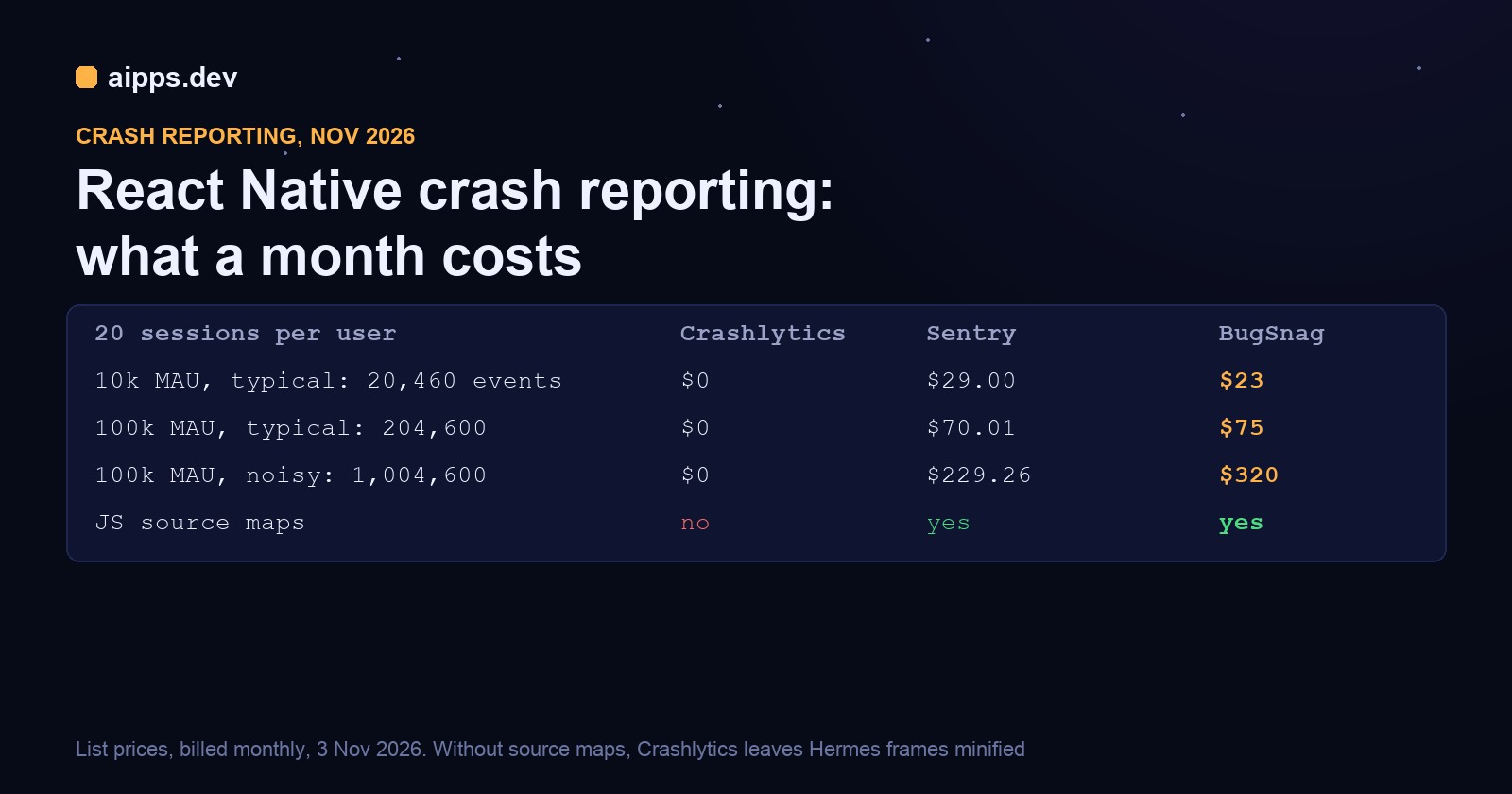
The short answer: Crashlytics costs $0 at any size but can't read your JavaScript stack traces, because Firebase has no source map support. Sentry and BugSnag can, and at 10,000 monthly users with a typical error rate either one costs $20 to $29 a month. At 100,000 users the same app costs about $70 on Sentry or $75 on BugSnag, and what moves the bill most is how many handled errors you report, not how often the app crashes.
Below are the plans as listed on 3 November 2026, a worked cost table for 10,000 and 100,000 monthly active users (MAU), what happens when you pass a quota, the CI steps for each tool's symbols, and our own test of the manual route Crashlytics leaves you with on Hermes.
What each plan includes
Some third-party price lists still show BugSnag's free plan at 50,000 events a month. BugSnag's own page says 7.5K, and that's the figure used here. The prices above are in US dollars before tax.
Crashlytics has hard limits of its own, even though it has no bill. Firebase documents a maximum of 64 custom key-value pairs, up to 1 kB each, and logs capped at 64 kB per session, with older lines deleted. It also stores only the most recent eight non-fatal exceptions: send more and the older ones are lost. That last limit matters more in React Native than in a native app, because recordError is how you report every caught JavaScript error.
Sentry's and BugSnag's prices by volume
Sentry charges by the error above the 50,000 included. These are the Team and Business rates per error from Sentry's pricing docs, pay-as-you-go against a reserved volume bought up front.
BugSnag sells fixed steps instead. Its pricing page only shows a step's price after you pick it from a menu, so we read each one in a browser on 3 November 2026. Each price includes 1M spans.
How many events 10,000 and 100,000 users send
Vendors price events, not users, so you need a conversion. Ours is: events a month = MAU x sessions per user x (crash rate + handled errors per session). Put your own numbers in if you have them. Your analytics tool gives you sessions per user, and a week of any crash reporter gives you the rest.
We assumed 20 sessions per user a month, which is our assumption and not a measurement. For crash rates we used Luciq's Mobile App Stability Outlook 2025, based on 2024 data from apps on its platform: a median of 99.95% crash-free sessions and a 25th percentile of 99.77%. Handled errors have no published benchmark, so we picked three levels: 0.01 per session if you report only the unexpected ones, 0.1 if you report failed API calls too, and 0.5 if you report nearly every catch block.
Handled errors are 95% or more of the events in the typical and noisy rows. Moving from the median crash rate to the 25th percentile adds 3,600 events at 100,000 MAU. Going from 0.1 to 0.5 handled errors per session adds 800,000.
The cost table
Here's the arithmetic for Sentry at 204,600 errors, on Team's pay-as-you-go rates. Each rate is applied to the errors inside its band, which is how we read Sentry's table. The first 50,000 are included. The next 50,000 cost 50,000 x $0.0003625 = $18.13, and the last 104,600 cost 104,600 x $0.0002188 = $22.89. Adding the $29 plan gives $70.01.
For BugSnag we took the cheapest step that holds the month's events. So 204,600 needs the 300,000 step, because the 200,000 step is 2.3% short and being over on 4 days in 30 moves you up anyway. BugSnag's steps are coarse: 1,004,600 events just misses the 1M step and lands on 1.5M, so trimming 5,000 events a month would save you $80. Those steps are why Sentry wins the noisy row, while BugSnag is cheaper in the small ones.
Neither figure includes extras you may want. Sentry's plan gives 50 session replays and 1 cron monitor, then bills for more. BugSnag's span packs cost extra above 1M: the 7.5M pack brings Select at 50,000 events from $20 to $22 on yearly billing.
Free plans run out sooner than the 10,000 MAU row suggests. At 20 sessions per user, Sentry's 5,000 errors last to about 23,800 MAU on the quiet profile but only 2,440 on the typical one and about 500 on the noisy one. BugSnag's 7,500 events last to about 35,700, 3,660 and 750. Both free plans also limit you to one user, so a second developer means paying regardless of volume.
What one bad bug does to the bill
Take the typical app at 10,000 MAU, and a release with a retry loop that reports the same caught error 100 times a session, in 1,000 sessions. That's 100,000 extra events in one month, 120,460 in all. Each tool handles it differently.
Set your limits before this happens. On Sentry, set a pay-as-you-go budget, turn on spike protection, and use a sampleRate or a per-project rate limit for noisy projects. Sampled and filtered events don't count toward quota. On BugSnag, decide whether you want automatic upgrades. With them off, events over the quota are rate limited, and discarding an error class or app version removes those events from the count. Project caps are Enterprise only. For all three tools, the cheapest fix is to stop reporting errors you won't act on, such as failed requests while the phone is offline.
Crashlytics and Hermes: what you actually get
Crashlytics symbolicates native frames from your dSYMs and R8 mappings, but not JavaScript. A request for source map support on React Native Firebase was closed in June 2026, with a commenter explaining that Firebase itself doesn't deobfuscate JS stack traces, and the project's maintainer adding that "there is no technical ability to do this". The advice there is to keep your own source maps and run the traces through metro-symbolicate.
We tried that route on 3 November 2026, on a fresh Expo SDK 58 app with React Native 0.88.1, with one function that throws. expo export gave us a 1.25 MB Hermes bundle and a 3.81 MB source map, or 0.91 MB gzipped, in under 8 seconds. We didn't crash it on a device: we took two real positions for that function from the map and symbolicated them, using a stack we wrote by hand in the format below, frame names included.
Both lines are correct: line 5 is the throw, and line 4 is the if before it. If your console shows frames in another shape, rewrite them to this form. It works, but you have to do it per trace, and you can't group or search by the real function name in the Firebase console, because the console only ever sees the minified one.
The map must come from the exact build that crashed. To see how much that matters, we added one constant to App.js, built again and ran the same stack through the new map.
Nothing warned us. The second frame now blames a file in Expo that has nothing to do with the bug, and the only hint is that it looks odd. The first frame landing on the throw in the new file is luck. So tie every map to a version and commit.
Two easier facts came out of the same test. Exporting the same source twice gave byte-identical bundles and maps, so for an OTA bundle you can regenerate a map from the git tag, on the same machine and lockfile at least. Storage is also trivial: at 26 releases a year on two platforms, maps of this size come to about 198 MB, or 47 MB gzipped. Those are Android figures from a blank app, and yours will be larger, but it's still a small bucket. This export covers the JS bundle only: for what's embedded in a store build, keep the map that native build produced.
Uploading symbols in CI
Sentry
On Expo, add the plugin and the Metro config, then give the build a token. On EAS the token goes in as a secret, and the upload happens during the native build: the Android Gradle step sends maps and debug symbols, and two iOS build phases send the maps and dSYMs. On a bare project, npx @sentry/wizard@latest -i reactNative sets up the same steps.
That scoped upload package needs @sentry/react-native 8.9.0 or newer. If frames still look wrong, Sentry's docs name a bundle filename that doesn't match the one on the event as a common cause. Also look at Contexts, React Native, Hermes Debug Info on the event: true means the bundle shipped without Hermes source maps.
BugSnag
BugSnag's CLI runs after the build. Android generates its source map during the Gradle build. For iOS, set SOURCEMAP_FILE so the Xcode build writes one. BugSnag's page doesn't describe CI steps, so we've added the --api-key flag, which CLI 3.10.7 lists in its help for these commands. It also takes --version-name and --version-code if you need to override what it reads from the project.
Crashlytics
Native symbols mostly take care of themselves. Set Debug Information Format to DWARF with dSYM File for your iOS build types, and React Native Firebase's [RNFB] Crashlytics Configuration script phase handles the dSYM. Check it if your target name differs from your executable name: until a fix merged on 2 November 2026, that phase declared a dSYM input path that didn't exist for those apps, and pod install put it back each time you corrected it by hand. On Android, the Crashlytics Gradle plugin uploads the R8 mapping whenever the build makes one. Expo projects use the config plugin, which does these install steps for you.
NDK symbols are the one step that's off by default, and you need them for crashes in native libraries. React Native Firebase names the Yoga layout engine as one source of these.
For JavaScript, your CI has to do the saving: copy the release map somewhere durable, named by version and commit. Android writes it to android/app/build/generated/sourcemaps/react/release/index.android.bundle.map, and iOS writes it wherever SOURCEMAP_FILE points.
Which one to pick
You can also run two. Crashlytics is free and you probably have Firebase already, so one split is to leave it on for native crashes and send only JavaScript errors to a paid tool, which keeps the paid tool's event count down. We haven't measured how much two crash handlers interfere with each other, so test a forced native crash and a forced JS error on a release build and check that each reaches the tool you expect.
Whichever you pick, watch the numbers during a rollout. Google Play's bad behaviour line is a 1.09% user-perceived crash rate, and phased rollouts on the App Store and Google Play give you time to pause before everyone has the release. If you ship JavaScript fixes over the air, each update has its own bundle and needs its own map.
A crash fix is only useful once testers can install it. aipps.dev builds React Native, Android and iOS apps on real Macs and gives every build a QR install page. It doesn't upload dSYMs or source maps to your crash reporter for you, so keep the steps above in your own pipeline.
Read the build docsSources, read 3 November 2026: Firebase, Pricing (Crashlytics no-cost on both plans), Privacy and Security in Firebase (90-day retention), Customize your Crashlytics crash reports for Apple and Android (64 keys, 1 kB, 64 kB logs, eight exceptions), Get started with Crashlytics on Apple platforms (dSYM setting), Get readable crash reports on Android (mapping upload). React Native Firebase, Crashlytics usage and Android setup docs, issue 9038 (source maps), pull request 9411 and issue 9404 (dSYM input path). Sentry, Pricing page, Pricing docs (per-error rates, dropped data), Quotas docs, React Native Hermes source maps, Expo setup and Expo Updates source maps, source map troubleshooting. BugSnag, Pricing page (each step read in a browser, monthly and yearly, plus the quota FAQ), Managing event usage, Billing and plans, Showing full stacktraces for React Native, BugSnag CLI. Expo, Using Sentry. Luciq, Mobile App Stability Outlook 2025. npm registry for SDK versions. Our own test: Expo SDK 58, React Native 0.88.1, Hermes bytecode version 99, 3 November 2026. Google Play's 1.09% line comes from Android vitals, as cited in our phased rollouts article. Cost tables are our own arithmetic from these list prices and the assumptions stated above.