An iOS build on CI depends on three versions that move on different schedules: the Xcode you build with, the macOS the runner boots, and the SDK minimum App Store Connect accepts. Apple ships a new Xcode major every September, raises the upload minimum about seven months later, and partway through each cycle a new Xcode minor starts needing a newer macOS. CI providers then decide which Xcodes to keep on which image, and some drop them without notice. Below are the actual numbers as of 28 October 2026: which Xcode runs on which macOS and builds for which iOS versions, what each GitHub Actions macOS image carries and what its default is, how long GitHub, Xcode Cloud, Codemagic, Bitrise and CircleCI keep old versions, and how to pin an Xcode so a quiet image update can't change your build.
The floor: what App Store Connect accepts
Since 28 April 2026, Apple's upcoming-requirements page says: "Apps uploaded to App Store Connect must be built with Xcode 26 or later using an SDK for iOS 26, iPadOS 26, tvOS 26, visionOS 26, or watchOS 26." A build made with Xcode 16.4 gets ITMS-90725 (SDK version issue) at upload, however well it runs. The rule is about the SDK you build against, not the oldest iOS you support. A separate rule, in force since 9 September 2026, says uploads must target iOS 13 or later, and Xcode 26 itself only goes down to iOS 15.
The date moves every spring, about seven months after the Xcode it names. We counted the days from each Xcode's first release to the day uploads required it:
So a build machine with only Xcode 26 keeps working until about late April 2027, if Apple keeps the pattern. Every store date for this year and next is in our app store deadlines calendar for 2026 and 2027. This article is about the other half: getting the right Xcode onto the runner, and keeping it there.
Which Xcode runs on which macOS and builds for which iOS
From Apple's Xcode support page, with release dates and build numbers from xcodereleases.com. "iOS targets" is the range of iOS versions an app built with that Xcode may support when it is uploaded to App Store Connect.
Three things in this table catch CI setups out.
First, Xcode 26.4 needs macOS Tahoe 26.2. Xcode 26.0 to 26.3 ran on Sequoia 15.6, so a macOS 15 runner was fine until 24 March 2026, when 26.4 shipped. From then on, the newest Xcode 26 needed a macOS 26 machine. Xcode 16 did the same a year earlier: 16.3 needed Sequoia 15.2, so macOS 14 runners stopped at 16.2. Plan for a later Xcode 27 minor to need a newer macOS in the same way.
Second, Xcode 27 needs Tahoe 26.6. It runs on macOS 26, not only on macOS 27, so a self-hosted Mac on Tahoe 26.6 can build with it today. Whether a hosted image offers it is a separate question (next section).
Third, Xcode 26 and 27 don't go below iOS 15. A project, Podfile or pod that still sets iOS 13 or 14 gets warnings, and some pods fail to build, until you raise it to 15. React Native 0.76 and later already need iOS 15.1, so most React Native apps are past this.
What each GitHub Actions macOS image carries
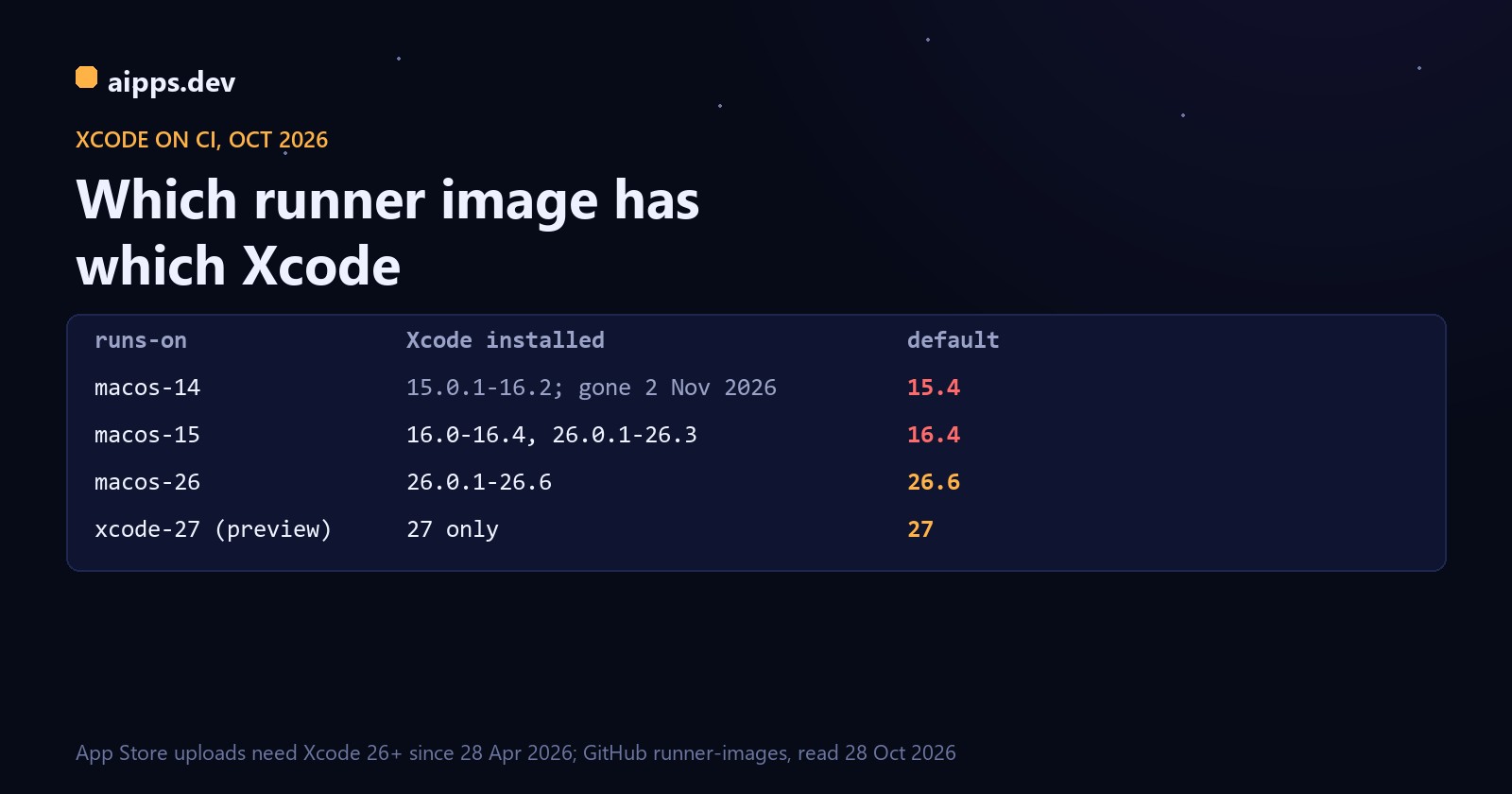
GitHub's runner-images readmes list the Xcode versions on each image. These are the arm64 images (the plain labels), read on 28 October 2026:
Read the default column first. A job on runs-on: macos-15 that doesn't select an Xcode builds with 16.4, and App Store Connect rejects the upload even though Xcode 26.3 is installed on the same machine. On macos-14 there is no Xcode the App Store still accepts at all.
The rules behind these lists, from the runner-images README: "only one major version of Xcode will be supported per macOS version", all minor versions of that major are kept, "when a new patch version is released, the previous patch version will be replaced", betas and RCs appear only on the newest image, and only three major.minor versions of platform tools and simulator runtimes are kept. Each rule shows in the table. macos-15 keeps 16.x as its own major and also has 26.x only up to 26.3, the last one that runs on macOS 15. 26.4 was replaced by 26.4.1, and the Xcode_26.4.app path is now a symlink to it. macos-26 has only the iOS 26.2, 26.4 and 26.5 simulators, so a test job that asks for an iOS 26.0 simulator can't find one.
Xcode 27 isn't on macos-26 even though it would run there, because of the one-major-per-image rule. GitHub opened a separate preview label, xcode-27 (and xcode-27-xlarge), on 16 July 2026 and moved it to a macOS 27 base on 16 September 2026. Its issue gives no GA date and warns of queueing while capacity is balanced.
How long an image lives: macos-14 as the worked example
GitHub supports at most two GA images and one beta, and starts retiring the oldest label once a new OS image goes GA. For macos-14, runner-images issue #13518 gives this schedule:
Any workflow that still says macos-14 fails for good on 2 November. GitHub's suggested replacements are macos-15 or macos-26 (macos-latest), and macos-15-large or macos-latest-large for Intel. A new label fixes uploads only if the job also selects an Xcode 26. Under the same policy, the next image in line once a newer OS image goes GA is macos-15, the one that still holds Xcode 16.
How long other CI services keep old Xcodes
Xcode Cloud is the one to watch. A Classmethod engineer logged two removals that had no release note. On 30 September 2025 Xcode Cloud dropped Xcode 26.0, 15 days after it shipped, together with every 15.x and 16.x release. On 16 April 2026 it dropped 26.1.1, 156 days after release, and 26.4.1 appeared the next morning. A workflow pinned to a version that disappears stops building. Set Xcode Cloud workflows to "Latest Release" unless you have a reason not to, and check the version in the build log.
Codemagic ties removals to Apple's upload rule, so Xcode 16 can go from its pool sooner than from Bitrise or CircleCI. Its Xcode 15 machines went through brownouts in late October and early November 2025. Codemagic also resolves a pinned patch to the newest patch, like GitHub: "26.4" means 26.4.1 once 26.4.1 is out. For the price per build minute on each service, see what iOS and Android builds cost on CI in 2026.
Pin the Xcode, then check it
Pin to major.minor, not to a patch: every provider above swaps patches in place, and a pinned patch path can vanish. Then make the job fail if it got something else. On GitHub Actions, set DEVELOPER_DIR for the whole job rather than running sudo xcode-select in one step, so every later step and tool (xcodebuild, xcrun, fastlane, CocoaPods) sees the same Xcode:
Why not macos-latest: GitHub moves -latest labels to a new OS over one to two months, and the default Xcode moves with it. A release build that changes Xcode without a commit is the one you can't reproduce when a crash report comes in. Use macos-latest on a scheduled job that tells you early what the next image breaks.
On other services the same pin is one setting:
Write the Xcode version and build number (xcodebuild -version) into the build log or artifact name. When a build misbehaves months later, "built with 26.6, 17F113" settles it in seconds.
The yearly calendar, so it doesn't surprise you
For a team on GitHub Actions today, that means: move anything on macos-14 this week, put release builds on macos-26 with Xcode 26.6 pinned through DEVELOPER_DIR, run a weekly job on xcode-27 to find what Xcode 27 breaks, and switch release builds to Xcode 27 well before April 2027.
aipps.dev builds React Native, Android and iOS apps on our own Mac mini and gives every build a QR install page for testers, so you don't have to track runner images yourself.
See aipps.devSources, read 28 October 2026: Apple, Xcode support page, minimum requirements and supported SDKs (developer.apple.com/support/xcode); Apple, Upcoming requirements (developer.apple.com/news/upcoming-requirements) for the Xcode 15, 16 and 26 upload rules and the iOS 13 minimum; xcodereleases.com for release dates and build numbers; GitHub actions/runner-images README (software, image and Xcode support policies) and the macos-14-arm64, macos-15-arm64 and macos-26-arm64 readmes (images 20260831, 20260907 and 20261013); runner-images issues #13518 (macOS 14 deprecation and brownouts) and #14404 (xcode-27 preview); Classmethod, "Xcode 26.1.1 suddenly became unavailable on Xcode Cloud without any prior notice" (18 April 2026); Codemagic docs, Xcode update policy, and status page; Bitrise docs, Stack deprecation and removal policy; CircleCI docs, Xcode image release, update and deprecation policy.