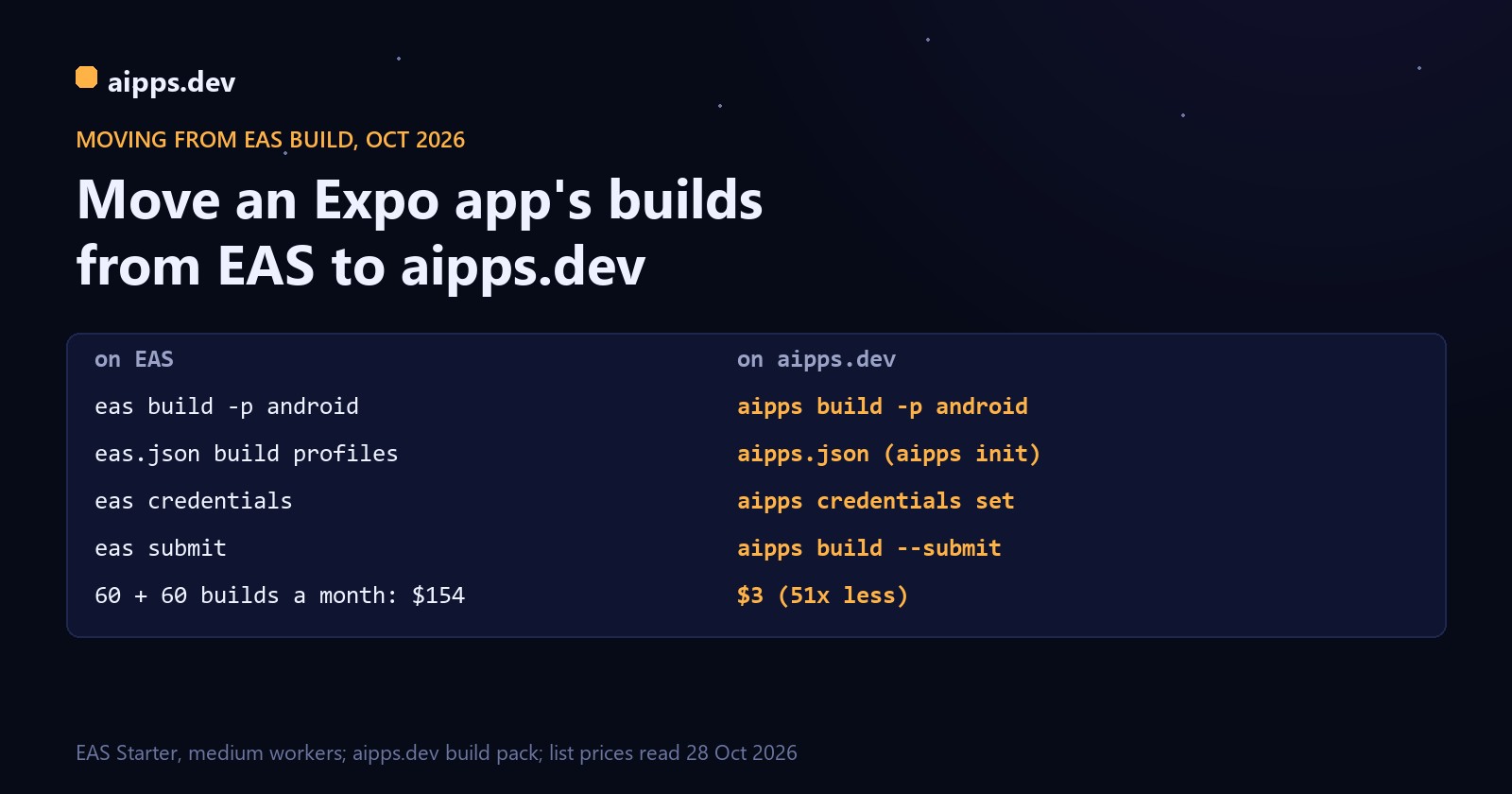
You have an Expo app, an eas.json, and a monthly EAS bill that grows with every preview build. This guide moves the builds to aipps.dev without touching the app itself: same bundle ID and package name, same signing key, same store listings, and EAS Update can stay where it is. It takes about an hour, most of it waiting for the first two builds. At the end there is a cost table for five team sizes, worked from both price lists.
Disclosure: aipps.dev is our product. Expo's prices are from expo.dev/pricing and ours from aipps.dev/pricing, both read on 28 October 2026; the side-by-side of the two services is in Expo EAS Build vs aipps.dev in 2026.
What moves and what stays
Nothing is cancelled on the Expo side until you decide to. A sensible order is to run both for a week: keep production releases on EAS, send preview builds through aipps.dev, then move the store builds once the first TestFlight and Play uploads have gone through.
Step 1: install the command line and run aipps init
You need Node.js 20 or newer. Make an API key in the aipps.dev console under Keys, then in the project folder:
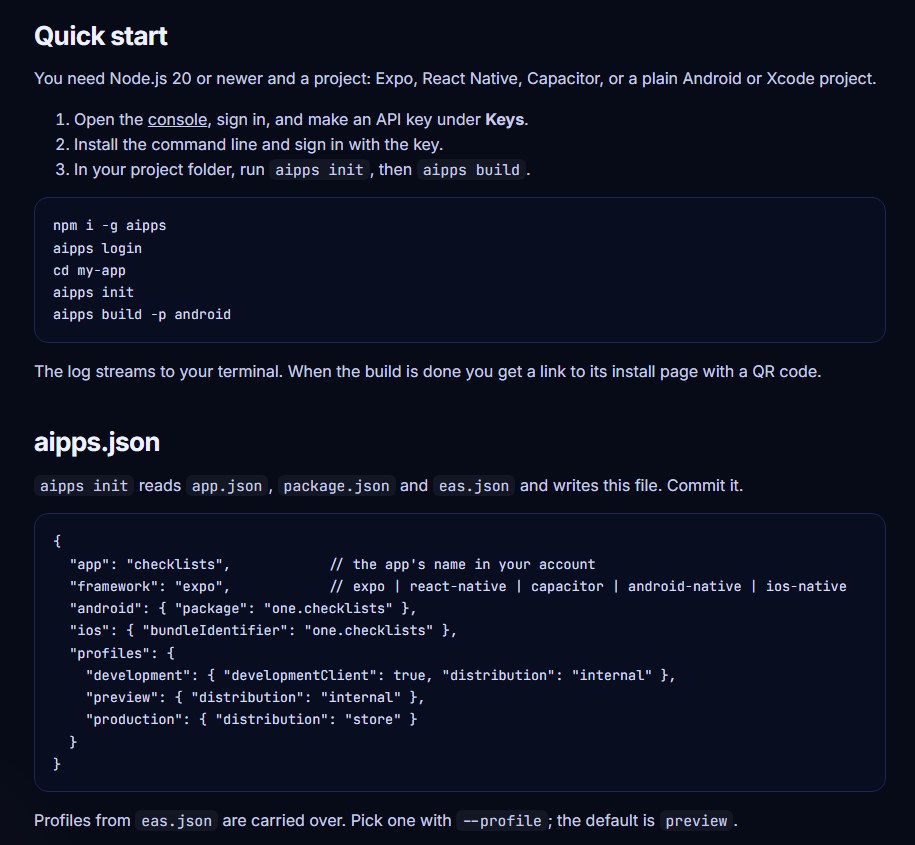
aipps init sees expo in package.json and saves the app as an Expo project, takes the bundle ID and package name from app.json, and copies your eas.json build profiles. Commit aipps.json next to eas.json.
What happens to eas.json
Here is a typical eas.json and the aipps.json that aipps init writes from it. From each profile it keeps distribution, developmentClient, env and channel; the development, preview and production profiles always exist.
The eas.json settings that work differently
Two rules decide what kind of build you get. The profile named production is the store build (.aab for Google Play, App Store .ipa); every other profile, including your own names such as staging, makes an installable test build. And development builds use the Debug configuration, as they do on EAS.
Environment values need one change. aipps.dev never uploads .env files (nor keystores or certificates), and it doesn't set the env block of a profile during the build yet. What it does set is PROFILE, the name of the profile being built, so an app.config.js can pick per-profile values itself:
In the app, read the value with Constants.expoConfig.extra.apiUrl from expo-constants. Reading EAS_BUILD_PROFILE as well keeps the same file working on EAS while you run both. Only values that are public anyway belong here: anything in a mobile build can be read out of it, on EAS too. If you use EAS Update, the updates.requestHeaders line is the part that matters: it is how an app that wasn't built by EAS Build tells the update server which channel it follows. Keep runtimeVersion and updates.url as eas update:configure set them.
Step 2: bring your signing keys
Android: take your keystore from EAS
This is the one step not to skip. Google Play knows your app by its upload key; a build signed with a different key is refused. If EAS made the keystore for you, download it: run eas credentials -p android, pick the production profile, then the keystore, and choose the download option. You get the .jks file and EAS shows the key alias and both passwords. Then store it on aipps.dev:
Keep your own copy of the .jks somewhere safe as well. aipps credentials keystore -o upload.jks downloads it again from aipps.dev, so you are not locked in the other way either. A new app with no keystore gets one on its first Android release build; download that one too.
iPhone: an App Store Connect API key
aipps.dev signs iPhone builds with an App Store Connect API key you make, never with your Apple ID password. In App Store Connect, open Users and Access, then Integrations, App Store Connect API, and make a team key with the Admin role (it registers test phones and makes certificates and profiles). Download the AuthKey_XXXX.p8 file (Apple lets you download it once) and note the Issuer ID and your Team ID. If you already gave EAS an API key for submissions and it has that role, you can reuse it.
Signing certificates and provisioning profiles that EAS made stay in your Apple account; aipps.dev makes its own through the key and doesn't need them. Test phones you registered with EAS are already in your Apple team. To add one, aipps devices invite prints a link the tester opens in Safari on the iPhone, and the next build includes it.
Google Play uploads: reuse your EAS Submit service account
If you used eas submit for Android, you already have a Google service account JSON key with release rights in the Play Console. The same file works here:
Step 3: the first builds
The project is uploaded much as EAS does it: what git tracks, plus untracked files that aren't ignored. The log streams to your terminal and the build ends with a link to its install page. For a sense of timing, the median Android preview build on aipps.dev from 23 to 28 October 2026 took 14.9 minutes and the median Android production .aab 17.0 minutes, start to finish, for small to mid-size Expo and React Native apps.
Before moving the store builds, check one thing: the production .aab must be signed with the upload key Play expects. Play Console shows that key's SHA-1 fingerprint under Test and release, App integrity; compare it with keytool -list -v -keystore upload.jks. If they match, Play accepts the bundle in the next step.
Step 4: store releases
--submit implies the production profile and uses the app's own store keys from step 2. Build numbers go past whatever the store already has, so the first aipps.dev upload after a run of EAS builds doesn't collide with them, and you can drop autoIncrement. From TestFlight or the Play track, the release goes on exactly as before: phased release, review, staged rollout.
Step 5: CI
If eas build runs in your CI, swap the command and the token. The aipps command line reads AIPPS_API_KEY from the environment, so there is no login step. A GitHub Actions job that sends every merge to main to the Play internal track and TestFlight:
The CI job only uploads the project and follows the build, so the cheapest Linux runner is enough even for the iPhone build; add --no-wait to return at once and let the build finish on its own.
What it costs: EAS against aipps.dev
Builds split evenly between iPhone and Android, medium EAS workers ($2 an iOS build, $1 an Android build, the plan's credit taken off), 22 working days a month, and builds that count as one on aipps.dev (up to 20 minutes and 150 MB). aipps.dev gives 3 builds a day free and each $3 pack adds 10 a day, so the number of packs depends on your busiest day, not your average. The table shows both: packs for the average day and packs for a day twice as busy.
So a team that moves its builds pays between 21 and 97 times less, and the gap widens with volume because the EAS bill grows with every build while ours grows in steps of 10 a day. Longer builds narrow it: a build of 20 to 60 minutes, or with an app file over 150 MB, counts as three, and builds over 60 minutes need the Large add-on ($5 a month per app, up to 120 minutes and 2 GB). If your builds take 30 minutes, the 60 + 60 team needs about 16 build counts a day, 2 packs ($6) instead of 1, which is still 26 times less than $154. An app's first build on each platform counts as one at most, because it fills empty caches.
What you give up
Be clear about this before cancelling anything. On EAS Production, ten iOS builds run at once; aipps.dev runs one build at a time, two from the second pack, so a burst of builds waits in line. EAS Workflows has no counterpart; you run aipps build from the CI you already have. EAS can sign in to your Apple account and create everything for you; aipps.dev needs the API key from step 2. And per-profile environment values go through app.config.js until aipps.dev sets a profile's env during the build. If those matter more than the bill, keep EAS for the store builds and move only the preview builds, which are usually most of the count.
Move your Expo app's builds: aipps init reads your eas.json, and every build gets an install page with a QR code.
Open the consoleSources: expo.dev/pricing (plans, build credit, per-build prices, concurrency), read 28 October 2026; aipps.dev/pricing and aipps.dev/docs, same day; the aipps command line (npm package aipps) for how aipps init carries eas.json over; build times from the aipps.dev build records, 23 to 28 October 2026.